
Many users install a custom launcher on their Google TV device to create a simpler interface without sponsored content. However, a common problem occurs when the Google TV default launcher keeps resetting. This happens frequently on devices such as Chromecast with Google TV, Sony BRAVIA televisions, and TCL smart televisions. When the television restarts, or when the user presses the remote control home button, the original Google TV interface returns.
This behavior frustrates users who prefer a clean home screen. This article explains why the system reverts to the original interface. It also provides clear, step-by-step solutions to keep your custom launcher active. These steps apply to most modern televisions and streaming devices running the Google TV operating system.
Krótka odpowiedź
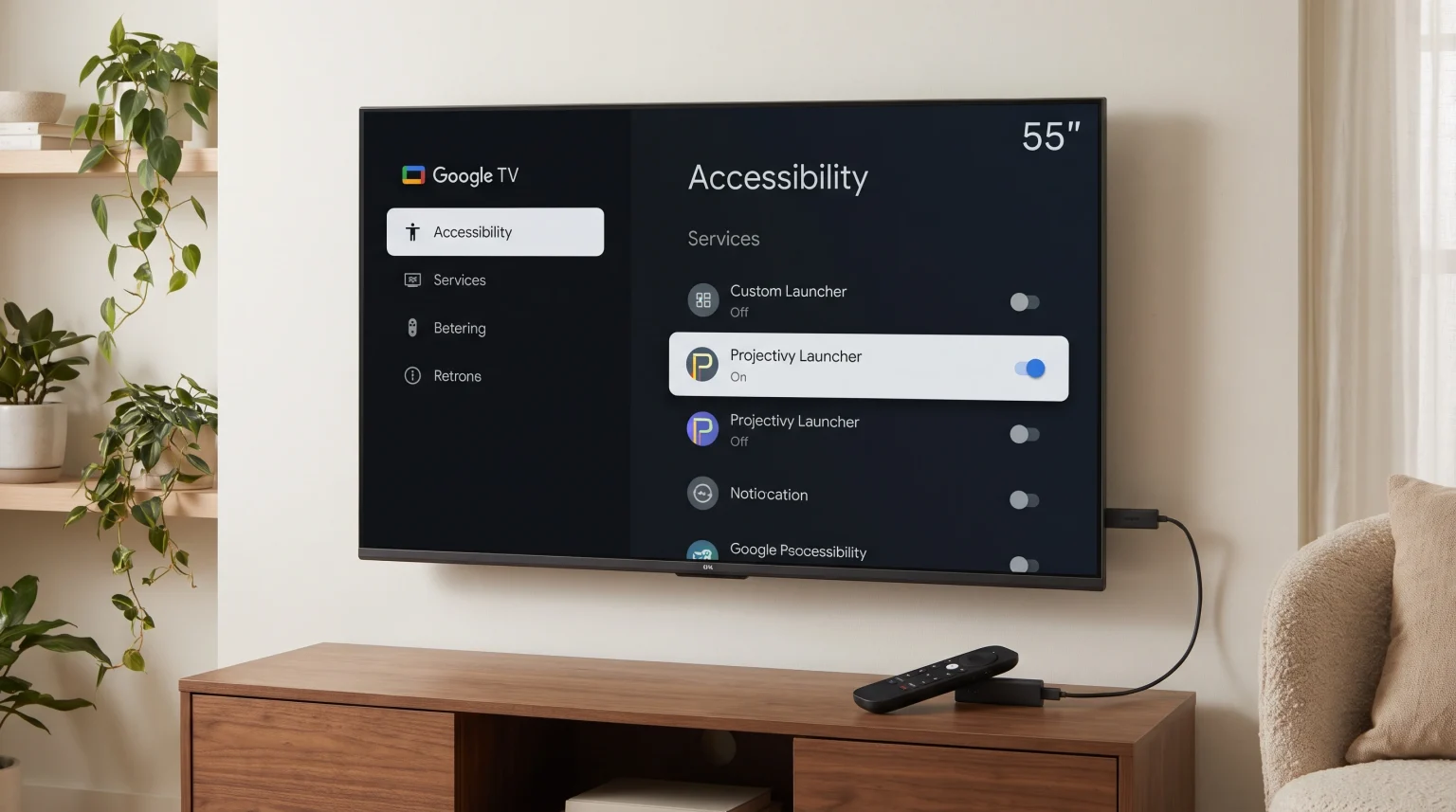
If your Google TV default launcher keeps resetting, the most common cause is a disabled Accessibility service. Google TV software updates frequently reset these system permissions for security reasons. To fix this problem quickly, open your television settings, navigate to the System menu, open the Accessibility section, and turn on the permission for your custom launcher application. If the original interface still returns, you may need to clear the system cache, free up storage space, or use advanced ADB commands to disable the original Google TV launcher completely.
Why the Google TV Default Launcher Keeps Resetting
Google designs its operating system to prioritize the default user interface. The system contains specific software rules that protect the main launcher.
Automatic Software Updates
When your device installs a system update, the operating system often resets custom user settings. Google TV prioritizes security and system stability during these updates. If the system detects a third-party application managing the home screen, the update will usually revoke the application’s permissions. This action instantly restores the default Google interface.
Accessibility Permission Reversals
Custom launchers require specific system permissions to operate correctly. They use Android Accessibility services to detect when you press the home button on your remote control. If the Google TV operating system detects that system memory is low, it may automatically close background applications. When the system closes the custom launcher, the Accessibility permissions often disable automatically.
Low Storage Space and Memory
Televisions and streaming sticks have limited internal storage and Random Access Memory (RAM). The Google TV default launcher requires a large amount of memory to load background videos and sponsored content. If the device runs out of memory, the entire operating system may crash and restart. When the system restarts after a crash, it always loads the default launcher first.
How to Keep Your Custom Launcher Active
You can solve this problem using a few different methods. Start with the easiest method first.
Method 1: Re-Enable Accessibility Settings
This is the most common solution. You must tell the television that your custom launcher is allowed to control the home screen.
Otwórz plik Ustawienia menu on your Google TV device.
Przewiń w dół i wybierz System.
Wybierz Accessibility.
Scroll down to the Services sekcja.
Find the name of your custom launcher (for example, Projectivy Launcher or FLauncher).
Select the application and change the status to Włącz.
Confirm the security warning.
Method 2: Use a Button Mapper Application
Sometimes, the custom launcher works, but pressing the home button on the remote control still opens the Google TV default launcher. You can fix this by installing a button mapper application from the Google Play Store.
Download an application like “Button Mapper” from the Google Play Store.
Open the application and grant the required Accessibility permissions.
Wybierz Home Button option.
Set the Single Tap action to open your custom launcher application instead of the default home screen.
Method 3: Disable the Default Launcher via ADB (Advanced)
If the Google TV default launcher keeps resetting despite the previous steps, you can disable the original launcher completely. This method uses Android Debug Bridge (ADB) commands. You will need a computer or a mobile phone with an ADB application.
Włącz Opcje programisty on your Google TV by going to Settings > System > About, and clicking on the Android TV OS Build number seven times.
Otwórz Opcje programisty and enable USB Debugging lub Network Debugging.
Note the IP address of your television from the Network settings.
Connect your ADB application to the television IP address.
Send this exact command:
pm uninstall -k --user 0 com.google.android.apps.tv.launcherxPress enter. The default launcher is now uninstalled for the current user.
Note: If you perform a factory reset on your television, the default launcher will return.
Comparing the Default Launcher and Custom Launchers
Users choose custom launchers because they operate differently than the default system. This comparison table explains the primary differences.
| Funkcja | Google TV Default Launcher | Custom Launcher (e.g., Projectivy) |
| Interface design | Focuses on content recommendations | Focuses on installed applications |
| Advertisements | Displays sponsored banners | No sponsored content |
| System resources | High memory and processor usage | Low memory and processor usage |
| Customization | Very limited layout options | High layout and color customization |
| Startup speed | Slower startup due to internet checks | Fast startup |
If you are evaluating television hardware and want to know more about different software systems, you can read our guide comparing the Najlepszy system operacyjny dla telewizorów Smart TV do obsługi IPTV w 2026 roku.
How This Affects TV Shadow IPTV Users
Using TV Shadow IPTV requires a stable media player application. When the Google TV default launcher uses too much memory to load advertisements, your television has less memory available for video streaming.
If you use a custom launcher, your television operates faster. A clean launcher allows you to place your preferred IPTV player directly on the main screen. You do not need to scroll through Google’s recommendations to find your live television applications.
However, custom launchers are only available on Android-based systems. If you are comparing different television brands, you might want to read our article discussing Samsung Tizen kontra Sony BRAVIA Google TV: Który z nich jest lepszy do IPTV w 2026 roku?. Samsung Tizen does not support Android custom launchers. Sony BRAVIA uses Google TV, which allows full custom launcher installation.
Launcher Performance and Live Football
Watching live football requires excellent hardware performance. Sports broadcasting uses high framerates and fast motion. The television processor must handle the video signal without interruptions.
When the Google TV default launcher keeps resetting in the background, it consumes processor power. This background activity can cause your live football stream to hesitate or buffer.
By keeping a lightweight custom launcher active, you dedicate maximum processor power to the video stream. This ensures smoother motion handling and better picture quality during fast sports action. Furthermore, removing background interface processes can prevent image processing errors. If you experience poor image quality during matches, read our guide explaining Dlaczego obraz z IPTV jest rozmyty na nowym telewizorze 4K?.
Wnioski
It is frustrating when the Google TV default launcher keeps resetting. The operating system is designed to protect its original interface and display sponsored content. However, you can maintain control over your television.
By configuring your Accessibility settings correctly, using a button mapper application, or utilizing ADB commands, you can ensure your custom launcher stays active. A clean, custom interface uses less memory, operates faster, and provides a better experience when using TV Shadow IPTV and watching live sports. Monitor your settings after every system update, as Google may reset your preferences automatically.
Najczęściej zadawane pytania (FAQ)
Why does my custom launcher stop working after a device restart?
When the device restarts, the operating system loads the default system files first. If the custom launcher does not have permission to start automatically, the system will load the default Google TV interface instead.
Is it safe to disable the Google TV default launcher with ADB?
Yes, it is generally safe. The ADB command removes the launcher for the active user, but it does not delete the core system files. A factory reset will completely restore the default launcher.
Do I need a computer to use ADB commands?
No. You can use an Android smartphone. You must download an application called “Remote ADB Shell” from the Google Play Store and connect to your television using your local Wi-Fi network.