
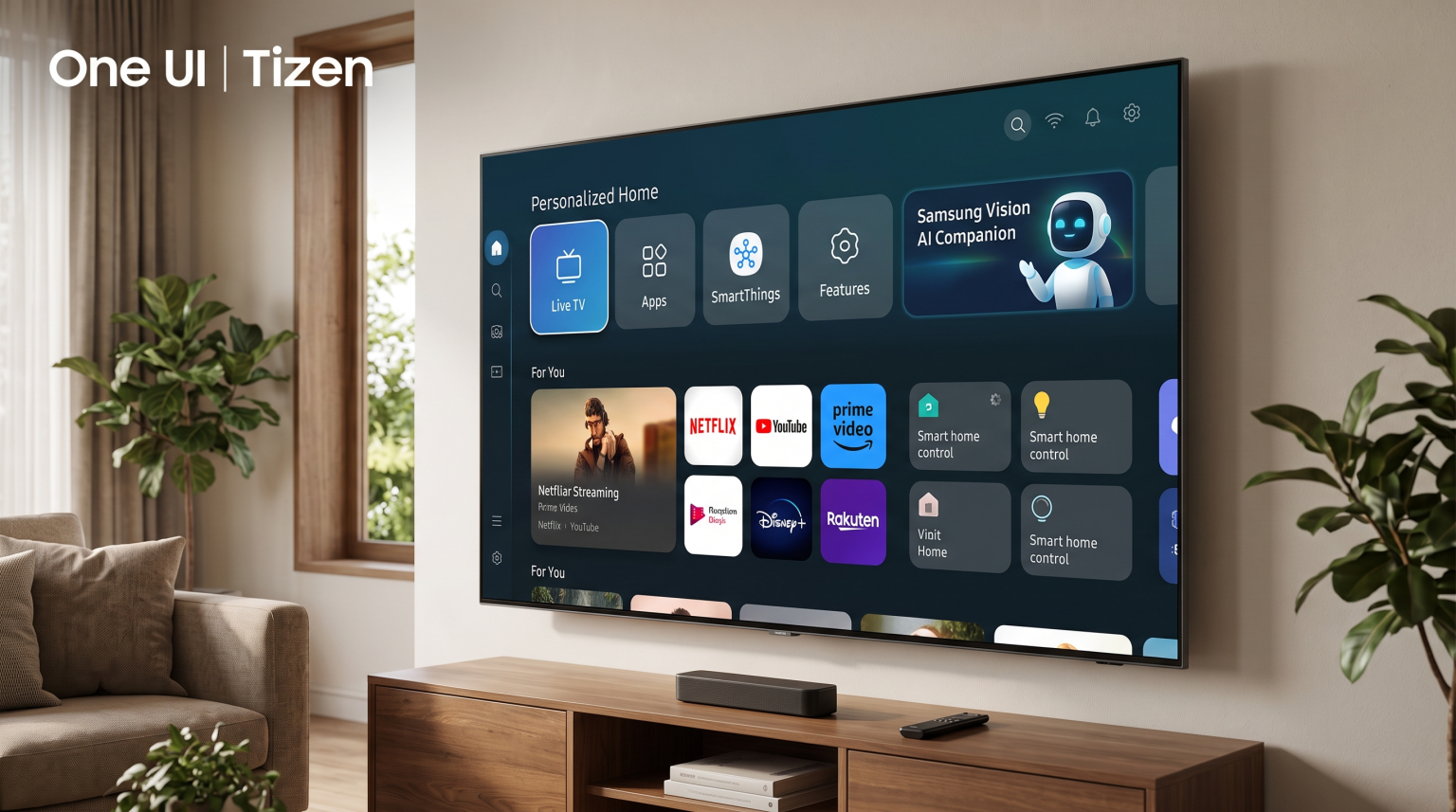
Samsung changed the operating system for its Smart TVs in 2026. The new software interface is called One UI Tizen. This update brings the television menu closer to the menu design found on Samsung Galaxy smartphones. Samsung One UI Tizen replaces the older Tizen Smart Hub interface.
The 2026 software update introduces major changes to how users navigate their television. The new system includes better artificial intelligence tools, a personalized home screen, and improved integration with Samsung SmartThings.
Samsung also announced a new software update policy. The manufacturer now provides free One UI Tizen operating system upgrades for seven years. This policy applies to new 2026 models and select televisions released from 2023 onwards. This means a compatible Samsung Smart TV will receive the latest applications and security updates until at least 2030.
Krótka odpowiedź
Samsung One UI Tizen 2026 is the newest operating system for Samsung Smart TVs. The software provides a clean interface, advanced artificial intelligence features, and seven years of guaranteed software updates. Samsung One UI Tizen is suitable for users who want a simple television interface and own other Samsung smart home devices.
However, Samsung One UI Tizen does not support Google Play or native Android applications. Users who want the largest selection of third-party applications or native Android support should choose a television that uses the Google TV operating system, such as a Sony BRAVIA.
Key Features of Samsung One UI Tizen 2026
The new Samsung One UI Tizen operating system includes several technical improvements. Samsung designed these features to make the television faster and easier to use.
Redesigned Home Screen
The 2026 One UI Tizen home screen organizes content more efficiently. The screen separates live television, streaming applications, and connected devices into clear categories. Users can customize the home screen to show their favorite streaming services first. The interface responds quickly to remote control commands.
Samsung Vision AI Companion
The 2026 update introduces the Samsung Vision AI Companion. This artificial intelligence assistant appears on the screen to help users find content. The Vision AI system provides personal recommendations based on user viewing habits. The system can process voice commands quickly using the built-in television processor.
Samsung Knox Security
Smart televisions connect to the internet and store personal data. Samsung includes Knox Security in the One UI Tizen system. Samsung Knox Security blocks malicious applications and dangerous websites. The security system protects passwords and protects other connected smart home devices. Samsung updates this security software continuously.
Seven-Year Update Guarantee
Many older Smart TVs stop working with popular streaming applications after a few years. Samsung solves this problem with a new seven-year update policy. If you buy a 2026 Samsung Smart TV, the television will receive free software upgrades for seven years. The television will support new applications and new software features during this time.
Samsung One UI Tizen vs Sony Google TV
Buyers often compare Samsung televisions with Sony televisions. Samsung uses the One UI Tizen operating system. Sony uses the Google TV operating system. Both systems are excellent, but they operate differently.
Jeśli chcesz porównać systemy operacyjne telewizorów, nasz przewodnik po Najlepszy system operacyjny dla telewizorów Smart TV do obsługi IPTV w 2026 r.: Tizen kontra Google TV kontra webOS explains the differences in detail.
Tabela porównawcza
| Funkcja | Samsung One UI Tizen 2026 | Sony Google TV |
| System operacyjny | System operacyjny Tizen | Android TV / Google TV |
| Ekosystem aplikacji | Samsung Apps | Sklep Google Play |
| Obsługa aplikacji na Androida | Nie | Tak |
| Aktualizacje oprogramowania | 7 years guaranteed | Depends on the model |
| Smart home system | Samsung SmartThings | Google Home |
| Asystent głosowy | Samsung Bixby / Vision AI | Asystent Google |
| Sideloading apps | Very difficult | Easy (using APK files) |
App Store Differences
The biggest difference between the two systems is the application store. Sony Google TV uses the Google Play Store. The Google Play Store contains thousands of applications, including many independent tools and video players. Samsung One UI Tizen uses the Samsung App Store. The Samsung App Store includes all major streaming services, but it has fewer independent applications than Google Play.
Installation Freedom
Sony Google TV allows users to install Android applications from outside the official store. This process is called sideloading. Users can download an APK file and install it directly on the Sony television. Samsung One UI Tizen does not use APK files. Users cannot easily sideload applications onto a Samsung television. Users must rely on the official Samsung App Store.
Using IPTV on Samsung One UI Tizen
Many users want to watch IPTV on their new Smart TV. TV Shadow IPTV provides high-quality IPTV services. However, the television operating system determines how you can watch these services.
IPTV Application Availability
Samsung One UI Tizen does not support popular Android IPTV applications like TiviMate. TiviMate only works on Android devices. However, the Samsung App Store includes several good alternative IPTV players. Popular IPTV applications for Samsung One UI Tizen include:
Odtwarzacz IBO
Flix IPTV
Odtwarzacz Nanomid
Inteligentna telewizja IPTV
Set IPTV
Application availability depends on your country. Samsung sometimes removes IPTV applications from specific regional stores. You must check the Samsung App Store in your country to see which IPTV players are currently available.
M3U and Xtream Codes Compatibility
The IPTV applications on Samsung One UI Tizen support standard IPTV connection methods. Users can connect their TV Shadow IPTV subscription using an M3U playlist link. Most Samsung IPTV applications also support the Xtream Codes API connection method. Xtream Codes is usually the best connection method because it loads the Electronic Program Guide (EPG) quickly.
Wygoda obsługi pilota
The 2026 Samsung remote control is very minimalistic. The remote control has very few physical buttons. It does not have standard number buttons (0-9).
This design makes navigating normal streaming applications easy. However, the minimalist remote control can make IPTV navigation slightly slower. Users cannot press a number to change a television channel directly. Users must use the on-screen menu to select channels or use the channel up/down button.
External Devices for IPTV
If a user prefers the Samsung television hardware but dislikes the Samsung IPTV application options, there is a simple solution. The user can connect an external Android TV streaming device to the Samsung television using an HDMI cable. This allows the user to enjoy the Samsung picture quality while using Android applications like TiviMate for their IPTV service.
Read our comprehensive guide to Czy system Samsung Tizen sprawdzi się w IPTV w 2026 roku? for more detailed setup instructions.
Transmisje na żywo z meczów piłki nożnej i wydarzeń sportowych
Watching live football requires specific television hardware and software capabilities. Fast-moving sports can look blurry on cheap televisions. Samsung has added several new features in 2026 to improve the live sports experience.
Obsługa ruchu i częstotliwość odświeżania
When a football moves quickly across the screen, the television must process the image fast enough to prevent blurring. This processing is called motion handling.
High-end 2026 Samsung One UI Tizen televisions support a 120Hz or 144Hz refresh rate. Some premium models even support a 165Hz refresh rate. A 120Hz refresh rate means the television can update the picture 120 times per second. This high refresh rate keeps the football sharp and clear during fast camera movements. Cheaper Samsung models use a 60Hz refresh rate. A 60Hz television is acceptable for movies, but a 120Hz television is better for live football.
AI Soccer Mode
The 2026 Samsung televisions feature a new setting called AI Soccer Mode. This mode uses the television processor to analyze the video signal. The artificial intelligence system automatically adjusts the picture settings when it detects a football match. The system makes the grass look more vibrant and improves the sound to create a stadium atmosphere.
Przetwarzanie obrazów
Live football broadcasts often use compressed video signals. This compression can make the picture look noisy or unclear. The Samsung NQ4 AI Gen2 and Gen3 processors analyze the incoming video signal. The processor removes digital noise and upscales the video to 4K resolution. This processing helps IPTV sports channels look sharp on a large television screen.
Network Connection for Live Sports
Live sports require a stable internet connection. If the connection drops, the live video will pause and buffer.
Samsung One UI Tizen televisions include modern Wi-Fi technology. However, a wireless connection is vulnerable to interference from walls and other devices. For the best live football experience, users should connect their Samsung television directly to their internet router using an Ethernet cable. A wired Ethernet connection provides a stable signal. A stable signal prevents the IPTV stream from buffering during an important football match.
Learn more about display technology in our comparison of OLED kontra Mini-LED w transmisjach na żywo z meczów piłki nożnej].
Wnioski
The Samsung One UI Tizen 2026 update makes Samsung Smart TVs faster and more modern. The new interface is clean and simple to navigate. The addition of the Vision AI Companion helps users find content quickly. The most valuable improvement is the seven-year software update guarantee. This guarantee ensures that the television will remain useful and secure until at least 2030.
For IPTV users, Samsung One UI Tizen offers a stable viewing experience. The operating system provides excellent picture processing and fast motion handling for live football. However, buyers must remember that Samsung does not support Android applications. Users must be willing to use the IPTV applications available in the Samsung App Store, or they must connect an external Android TV streaming device to the television.
Najczęściej zadawane pytania
What is Samsung One UI Tizen?
Samsung One UI Tizen is the operating system used on Samsung Smart TVs starting in 2026. It controls the television menus, settings, and the application store. It replaces the older Tizen Smart Hub interface and looks similar to the interface on Samsung Galaxy smartphones.
Can I install Android apps on Samsung One UI Tizen?
No. Samsung One UI Tizen does not support Android applications. You cannot install applications from the Google Play Store. You can only install applications that are available in the official Samsung App Store.
Will my old Samsung TV get the One UI Tizen update?
Samsung provides the One UI Tizen update and seven years of software support for televisions released from 2023 onwards. If your Samsung television was manufactured in 2022 or earlier, it will likely not receive the new One UI Tizen interface.
Is TiviMate available on Samsung One UI Tizen?
No. TiviMate is an Android-exclusive application. Because Samsung televisions do not use the Android operating system, TiviMate is not available in the Samsung App Store. Samsung users must use alternative IPTV applications like IBO Player or Nanomid Player.
Does Samsung One UI Tizen support M3U playlists?
The operating system itself does not play M3U playlists directly. However, many third-party IPTV applications in the Samsung App Store support M3U playlists and Xtream Codes API. You can download one of these applications to use your IPTV service.
How do I update my Samsung television to One UI Tizen?
You can update your television using the settings menu. Press the Home button on your remote control. Go to Settings, then select Support. Select Software Update, and then select Update Now. If your television model is compatible, it will download and install the new software automatically.