
Many users wonder if they should use built-in television applications or buy an external streaming device. This article compares Smart TV apps vs streaming box applications. We explain which platform receives software updates more frequently.
Television manufacturers include built-in operating systems on their displays. Examples include Samsung Tizen and LG webOS. External streaming boxes connect to the television using an HDMI cable. Examples include the Apple TV 4K, Amazon Fire TV Stick, and Nvidia Shield.
Both systems allow users to download video applications, music applications, and IPTV players. However, application developers do not update all platforms at the same speed. Understanding these software update differences helps users choose the best hardware for long-term use.
Krótka odpowiedź
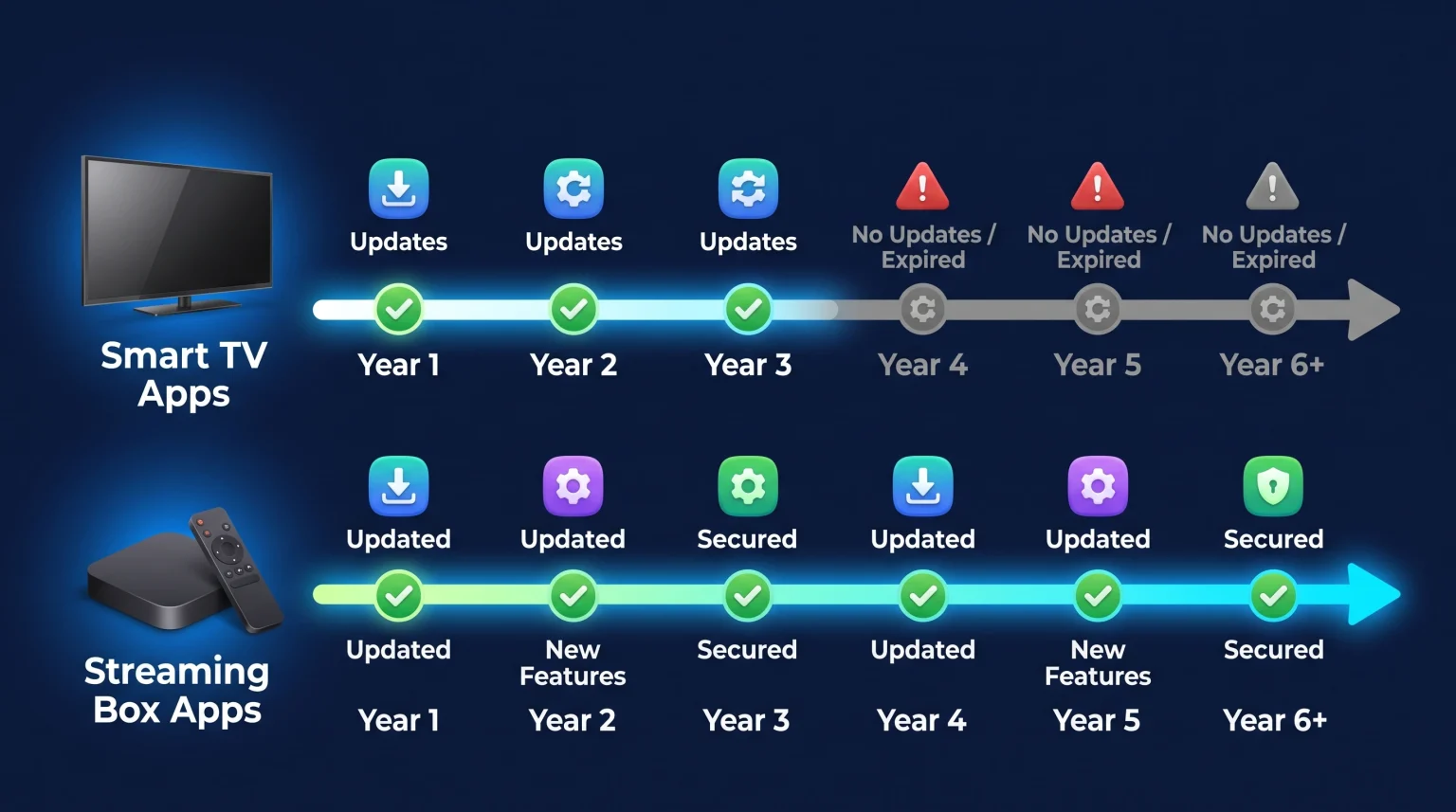
Streaming box apps usually receive software updates more often than Smart TV apps.
Application developers prioritize platforms with large, global user bases, such as Google Android TV, Amazon Fire OS, and Apple tvOS. These operating systems remain consistent across many different devices.
In contrast, television manufacturers often change their built-in operating systems every year. This fragmentation makes it difficult for developers to update applications for older television models. Therefore, an external streaming box provides better long-term application support and more frequent software updates.
Operating Systems and Update Cycles
To understand application updates, users must understand the underlying operating systems.
Smart TV Operating Systems
Television brands usually develop proprietary software. Samsung uses the Tizen operating system. LG uses the webOS operating system.
When a customer buys a 2026 Samsung television, the television uses the 2026 version of Tizen. Historically, television manufacturers do not provide major operating system upgrades to older televisions. A television purchased in 2023 usually stays on the 2023 software version.
Because the operating system does not update, application developers eventually stop releasing new application versions for that specific television model. If you are comparing television software, our guide to Najlepszy system operacyjny dla telewizorów Smart TV do obsługi IPTV w 2026 r.: Tizen kontra Google TV kontra webOS explains the differences between Tizen, Google TV, and webOS.
Streaming Box Operating Systems
Streaming boxes use standardized operating systems. Apple uses tvOS. Google uses Android TV or Google TV. Amazon uses Fire OS (which is based on Android).
These technology companies provide software updates for many years. For example, a five-year-old Apple TV still receives the newest tvOS software. Because the core software remains updated, application developers continue to release new application updates for these older streaming boxes.
Comparison: Smart TV Apps vs Streaming Box Apps
This table explains the main differences between television applications and streaming device applications.
| Funkcja | Smart TV Built-in Apps | External Streaming Box Apps |
| Frequency of app updates | Low to Medium | Wysoki |
| Long-term software support | Usually 2 to 3 years | Usually 4 to 7 years |
| System operacyjny | Tizen, webOS, Vidaa | tvOS, Google TV, Fire OS |
| App store size | Ograniczone | Bardzo duży |
| Hardware replacement cost | High (requires a new television) | Low (requires a new streaming box) |
IPTV App Availability and Updates
IPTV users need reliable software. IPTV applications require regular updates to support new video formats, improve Electronic Program Guide (EPG) loading speeds, and fix playback errors.
On an external streaming box using Google TV or Android TV, users can access the Google Play Store. The Google Play Store contains many popular IPTV players. These IPTV players receive automatic updates from the application developers. You can use these updated players with your Subskrypcja TV Shadow IPTV.
On a Smart TV using Tizen or webOS, the official application stores offer fewer IPTV players. Furthermore, developers may update the Tizen version of an IPTV player less often than the Android version of the same IPTV player.
M3U playlists and Xtream Codes configurations work on both platforms. However, the user experience is generally smoother on a streaming box because the IPTV application receives newer features more quickly.
Live Football and Sports Viewing Performance
Watching live football requires fast video processing and stable network connections.
A high-quality 4K television provides excellent picture quality, high refresh rates, and advanced motion handling. However, the television’s internal processor must handle the picture processing and the streaming application at the same time. If the television’s internal application is outdated, the live football stream may buffer or stutter.
Using an external streaming box separates the tasks. The streaming box processes the video application and the network stream. The television only processes the picture quality and motion handling. If you want to improve image clarity, read our article explaining Czym jest skalowanie rozdzielczości w telewizji i czy jest to przydatne w przypadku IPTV?.
Many premium streaming boxes also feature Gigabit Ethernet ports. This provides a more stable internet connection for live sports than a standard television Wi-Fi connection.
Hardware Lifespan vs Software Lifespan
A premium 4K television can display an excellent picture for ten years. However, the television’s internal applications may become slow or stop working after three years.
This difference creates a problem. The hardware lifespan is much longer than the software lifespan.
Users do not need to replace a functional television just because the applications are old. Instead, users can connect a modern streaming box to an older television. This strategy allows users to keep their expensive television screen while accessing the newest, most frequently updated streaming applications. For advice on choosing a new display, view our comparison of Najlepsze telewizory Smart TV do IPTV w 2026 roku: porównanie marek Samsung, Sony, LG i TCL.
Wnioski
When comparing Smart TV apps vs streaming box apps, streaming box applications win in longevity and update frequency.
Platforms like Google TV, Apple tvOS, and Amazon Fire OS provide centralized application stores. Developers update applications on these platforms constantly. Built-in television operating systems like Tizen and webOS receive fewer application updates over time.
For the best experience with video applications and TV Shadow IPTV services, a dedicated streaming box is the most reliable choice for long-term software support.
Najczęściej zadawane pytania (FAQ)
Do Smart TV applications update automatically?
Yes, most Smart TV applications update automatically if the television is connected to the internet. However, this only happens if the application developer releases an update for your specific television model.
Why do some applications disappear from my Smart TV?
Applications disappear when the developer stops supporting the television’s older operating system. The developer removes the application from the store because the application can no longer function correctly.
Can I use a streaming box on any Smart TV?
Yes. You can connect a streaming box to any television that has a standard HDMI port. The streaming box will bypass the television’s internal operating system.
Are streaming box apps faster than Smart TV apps?
Usually, yes. Premium streaming boxes often contain faster processors and more memory than standard televisions. This hardware allows applications to open faster and navigate more smoothly.
Do I need a Smart TV if I buy a streaming box?
Almost all new televisions are Smart TVs. You can simply ignore the smart features of the television, connect your streaming box to the HDMI port, and use the streaming box interface exclusively.