
Streamly IPTV is a popular media player application. Users load M3U (playlist files) and Xtream Codes playlists into the media player application. Many users watch international movies and live sports. These international users often need to change the audio track to their preferred language. In November 2026, the software developer released a new application update. The November 2026 update changed how the application handles language settings and the user interface.
Finding the correct audio track can be difficult. Some users do not understand the media player settings. This article explains how the Streamly IPTV audio language selection works after the November 2026 update. We will show you how to change the audio track during video playback. We will also explain why some television channels do not offer multiple audio languages. Read this guide to configure your Streamly IPTV application correctly.
Krótka odpowiedź
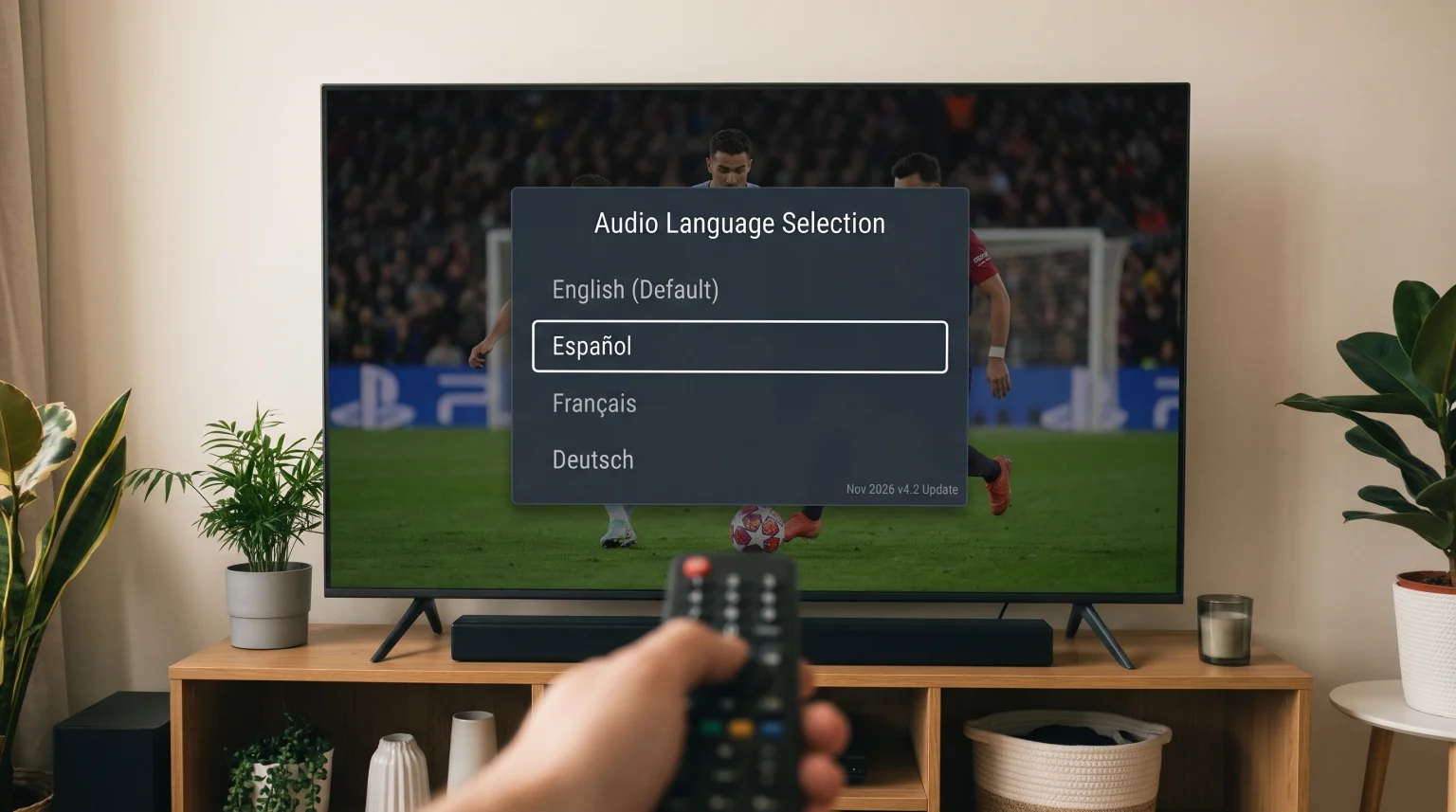
The Streamly IPTV audio language depends completely on the video source. If your IPTV provider includes multiple audio tracks in the video stream, you can change the spoken language inside the media player. During video playback, open the audio menu on the television screen. Select your preferred language from the list. The November 2026 update improved the user interface language translation. However, the media player cannot create a new audio language if the original video stream only contains one language track.
The November 2026 Streamly IPTV Update
The developers released a major software update for the Streamly IPTV application in November 2026. The software update focused on user experience and international language support. The developers wanted to make the application easier to use for global customers.
First, the application menu now supports more languages natively. Users can navigate the settings menu in their local language. The update improved the text translation quality for many European languages.
Second, the subscription screen now displays pricing in local currencies. The text on the subscription screen is fully translated. The currency translation helps users understand the software cost clearly.
Third, the interface for selecting subtitles and audio tracks is faster. The media player responds quickly when you open the playback menu. These improvements make the Streamly IPTV audio language selection process much smoother for daily television watching.
How to Change the Streamly IPTV Audio Language
If you watch a movie or a live television channel, you might hear the wrong spoken language. You can change this spoken language if the video stream includes alternative audio tracks. The process is fast and simple.
Follow these exact steps:
Start playing a live television channel or a movie.
Press the select button on your remote control. The select button opens the playback menu on the screen.
Locate the audio track icon on the television screen.
Select the audio track icon to open the audio menu.
Look at the list of available languages.
Select your preferred Streamly IPTV audio language.
Wait two seconds for the audio track to switch.
After you select the new language, the video will continue playing with the new audio track.
Setting a Default Audio Language
Some advanced IPTV applications allow users to select a default language in the main settings menu. If you set a default language, the media player will automatically select this language when you start a new video.
Users should check the main settings menu in the Streamly IPTV application. Look for a playback settings section. If a default audio language option is available for your specific device version, select your preferred language. If the default setting is not available, you must change the audio track manually during video playback.
Audio Tracks vs. Application Interface Language
Many users confuse the application interface language with the video audio language. These are two completely separate features.
The application interface language controls the text on the screen. This text includes menus, buttons, and error messages. The November 2026 update improved this interface language translation.
The video audio language is the spoken language you hear during the movie or the television show. Changing the application interface language to Spanish will not translate an English movie into Spanish. You must use the Streamly IPTV audio language menu during video playback to change the spoken words.
Comparison: Streamly IPTV vs. Other Players for Multilingual Audio
Different IPTV applications handle audio languages differently. Some applications offer better track selection than others. The comparison table below compares Streamly IPTV with two other popular media players.
| Funkcja | Streamly IPTV | TiviMate | IPTV Smarters Pro |
| Operating system support | iOS, Android, macOS | Android TV only | Android, iOS, Smart TVs |
| Audio track selection | Yes, during video playback | Yes, during video playback | Yes, during video playback |
| Interface language | Updated in November 2026 | Full translation available | Full translation available |
| Multiple audio tracks | Depends on the video stream | Depends on the video stream | Depends on the video stream |
| Live channel track changes | Yes, supports track changes | Yes, supports track changes | Yes, supports track changes |
All three applications can change audio tracks successfully. The Streamly IPTV application provides a simple interface that is easy to understand. TiviMate is also an excellent option for multilingual households, but TiviMate is only available for Android operating systems.
Why Are Some Audio Languages Missing?
Sometimes, you cannot find your preferred Streamly IPTV audio language in the menu. Missing audio languages are very common. Missing audio tracks usually happen for two distinct reasons.
First, the television channel might only broadcast one language. For example, a local news channel usually broadcasts in the local language only. The media player cannot generate a new language track. The media player only reads data from the video stream. If the video stream contains only one language, the audio menu will only show one language.
Second, the audio format might not be supported by your hardware device. If the audio track uses an unsupported audio codec, the media player might not play the sound. If you select a language and hear silence, your television cannot process the audio format.
TV Shadow IPTV Compatibility with Streamly
Because many website visitors ask about compatibility, we must explain how TV Shadow IPTV works with media players.
TV Shadow IPTV provides the video stream service. We do not provide the software application. You can use TV Shadow IPTV with many different media players. Streamly IPTV is fully compatible with TV Shadow IPTV. You can connect your TV Shadow IPTV service using an M3U playlist or using Xtream Codes login details.
If a TV Shadow IPTV channel includes multiple audio tracks, Streamly IPTV will detect these tracks. The Streamly IPTV application will display these audio tracks in the audio menu. TV Shadow IPTV does not have an official relationship with Streamly, Samsung, Sony, LG, or Google. You must configure the application settings yourself. We recommend testing different television channels to see which audio languages are available.
Electronic Program Guide (EPG) and Language Support
The Electronic Program Guide (EPG) displays the television schedule. The EPG shows the names of television shows and the broadcasting times.
Users often ask if changing the Streamly IPTV audio language will translate the EPG text. The answer is no. The EPG text language depends entirely on the XMLTV data file provided by your IPTV service.
If your IPTV provider supplies an English EPG file, the television schedule will appear in English. The Streamly IPTV application simply displays the text from the EPG file. The November 2026 application update does not translate EPG data automatically.
Changing Audio Language During Live Football
Many viewers watch live football matches every week. International football matches often include multiple commentary languages.
For example, a major football match might offer English, Spanish, and French commentary on the exact same television channel.
To change the commentary language during a live football match:
Open the live football stream.
Open the audio menu using your remote control.
Select the new commentary language.
The audio track will change immediately. You can enjoy the live football match in your preferred language.
Live football also requires good television hardware. If you watch live sports on a Smart TV, a fast refresh rate is important. A 120Hz television provides better motion handling than a 60Hz television. Better motion handling means the football moves smoothly across the screen. If you want to learn more about television hardware for sports, read our guide on Telewizory 60 Hz a 120 Hz do oglądania meczów piłki nożnej na żywo.
Please note that television hardware does not affect the Streamly IPTV audio language options. Picture processing, HDR (High Dynamic Range), and stream stability are completely separate from audio track availability. TV Shadow IPTV does not own broadcasting rights for UEFA Champions League or other sports competitions.
Using Streamly on Smart Televisions
The Streamly IPTV application is available on multiple operating systems. The software installation process depends entirely on your television brand.
Samsung televisions use the Tizen operating system. LG televisions use the webOS operating system. Sony televisions use the Google TV operating system.
Samsung Tizen does not support Android applications from Google Play. LG webOS also uses a unique application store. Sony Google TV uses the Google Play Store natively.
The available features in the Streamly application might change based on your television operating system. Some operating systems handle audio codecs better than other operating systems. This hardware difference can affect the Streamly IPTV audio language options.
If you are buying a new television and you need help choosing a brand, read our comparison of the Najlepsze telewizory Smart TV do IPTV w 2026 roku: porównanie marek Samsung, Sony, LG i TCL. Our guide to Najlepszy system operacyjny dla telewizorów Smart TV do obsługi IPTV w 2026 r.: Tizen kontra Google TV kontra webOS explains the exact differences between Tizen, Google TV and webOS.
Wnioski
The November 2026 update improved the overall user experience in the Streamly IPTV application. The software developer updated the interface language and translated the subscription screen clearly. The Streamly IPTV audio language selection process remains simple and effective. You can easily switch between available audio tracks during video playback.
Remember that the available languages depend entirely on the video stream provided by your IPTV service. The application cannot create a language that does not exist in the stream. Streamly IPTV is a very good media player for multilingual households. If your video stream provides multiple audio options, Streamly IPTV allows you to control your viewing experience easily. TV Shadow IPTV users can configure their application in minutes and enjoy international content seamlessly.
Najczęściej zadawane pytania
How do I fix the Streamly IPTV audio language if it is silent?
Open your television settings and change the audio output format to PCM (Pulse Code Modulation). If you select an audio track and hear no sound, your television might not support the original audio format. The PCM setting forces the television to decode the audio simply. The PCM setting usually fixes audio compatibility problems.
Can the Streamly application translate the audio automatically?
No. The application cannot translate spoken words. The media player can only play audio tracks that are already included in the video stream. The media player does not use artificial intelligence to translate voices in real time.
Why does a channel only show one audio language?
The television channel only broadcasts one audio language. If the broadcaster only includes one audio track in the video feed, the Streamly audio menu will only show one option. This limitation is a source limitation, not an application error.