
Are you frustrated trying to find TiviMate on your Samsung TV? If you’re one of the millions of US cord-cutters searching the Samsung App Store right now, you’ve likely come up empty-handed. The short answer is simple: TiviMate is an Android-exclusive IPTV player, and Samsung runs its own proprietary software.
But don’t panic just yet. You absolutely can enjoy the ultimate live TV experience on your big screen. We’ll explain why this compatibility issue exists and exactly how to bypass it in minutes.
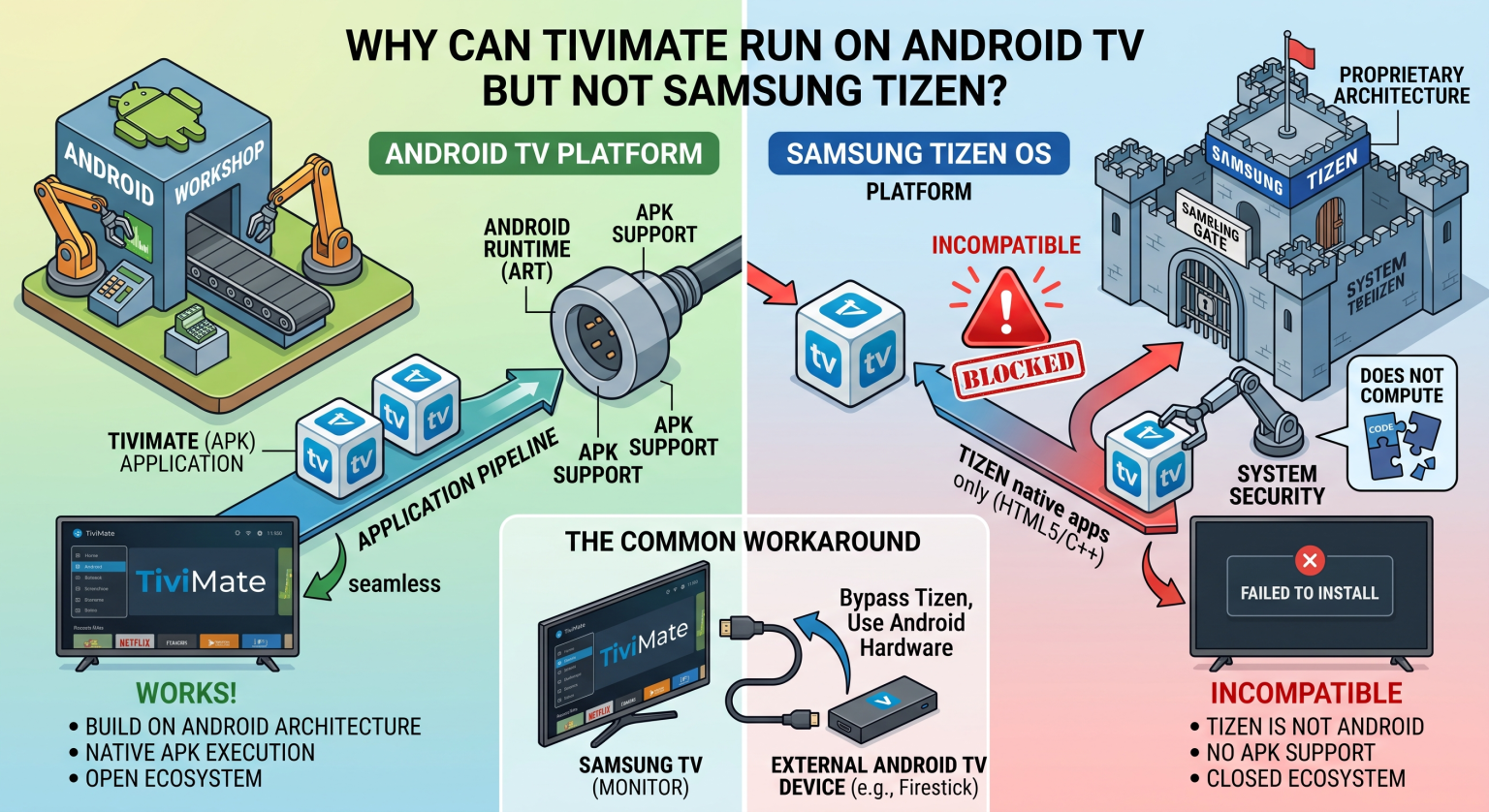
The Real Reason Behind the TiviMate Samsung TV Clash in the US
TiviMate is universally praised as the best IPTV player on the market. However, American consumers often face a technical wall when bringing it to their living rooms. That wall is System operacyjny Tizen.
Samsung smart TVs rely on Tizen, a Linux-based operating system designed specifically for the Samsung ecosystem. Tizen simply does not recognize Android APK files. Since the developer built TiviMate exclusively for Android devices, you cannot naturally sideload TiviMate on a Samsung smart TV.
Can You Install TiviMate on Tizen Using Sideloading?
No, direct sideloading is impossible. Unlike Amazon Fire or Google TV, Tizen’s strict framework blocks any third-party Android installations. To get an IPTV player for Samsung TV, you need an alternative strategy.
TiviMate on Samsung Smart TV: Operating Systems Compared
To understand your options, let’s look at how the top US TV platforms handle IPTV apps. Check out the comparison below before deciding on your setup.
| Operating System Environment | Sideloading Android APKs Allowed? | Native TiviMate App Available? | Best Device for TiviMate |
| System operacyjny Samsung Tizen | ❌ No (HTML5/Web-based) | ❌ No | Requires external device |
| Android TV / Google TV | ✅ Yes (Open ecosystem) | ✅ Yes (Google Play Store) | Nvidia Shield, ONN Box, Chromecast |
| Amazon Fire OS | ✅ Yes (Via Downloader App) | ✅ Yes (Manual Sideload) | Amazon Fire TV Stick 4K Max |
How to Use TiviMate on a Samsung Screen (The Best Workaround)
If you refuse to settle for TiviMate alternatives for Samsung, your best move is bypassing Tizen entirely. You can do this by upgrading your display with a cheap external streaming stick.
By plugging an Amazon Firestick 4K or a Walmart ONN Google TV box into your Samsung TV’s HDMI port, you bypass the TV’s native software. Your TV basically becomes a gorgeous monitor, while the external dongle handles the heavy Android processing. Once plugged in, you can seamlessly install TiviMate and load your favorite IPTV service.
Popular TiviMate Alternatives for Samsung Tizen
If you strictly refuse to buy extra hardware, you’ll have to abandon TiviMate and use native apps from the Samsung store. Applications like Odtwarzacz IBO, Set IPTV, and Bay TV function similarly to TiviMate. They allow you to input your M3U playlists directly into the Samsung smart TV interface, though they lack the premium polish of TiviMate.
Get Your TiviMate Samsung TV Setup Running Today
Whether you’re in the US or abroad, don’t let Tizen OS stop you from enjoying premium live sports and movies. The easiest path is grabbing a 4K streaming stick, sideloading the app, and taking total control of your entertainment.
Ready to build the ultimate cord-cutting machine? Order a 4K Android TV streaming device today, grab a premium TiviMate license, and revolutionize your home theater experience!
Setting Up TiViMate on Smart TVs This video provides a great visual walkthrough on the exact steps to search for and install alternative compatible apps when setting up an IPTV player on your television.
Często zadawane pytania (FAQ)
Is there a native TiviMate app for Samsung TV?
No, there is no official TiviMate app in the Samsung App Store. Because Samsung runs on Tizen OS and TiviMate is an Android exclusive, native installation is impossible.
How do I install TiviMate on my Samsung smart TV?
The most effective way is to plug an external Android-based device—such as an Amazon Firestick or Chromecast with Google TV into your Samsung TV’s HDMI port. You then install TiviMate directly on that external device.
What is the best IPTV player for Samsung TV?
If you want to use the native Tizen interface without buying a streaming stick, apps like IBO Player, Smart IPTV (SIPTV), or Set IPTV are excellent TiviMate alternatives available directly in the Samsung App Store.