
Are you confused by Amazon’s recent software shift in its Fire TV lineup? If you’re wondering whether your favorite streaming services will survive the upgrade, you’re not alone. The battle between Vega OS vs Fire OS apps is redefining how we consume entertainment today.
As Amazon transitions away from Android, understanding how these Amazon Fire TV operating systems handle your daily viewing habits is critical. For households in the United States, choosing the right device dictates whether you can seamlessly watch Hulu, locally stream US sports, or customize your home screen.
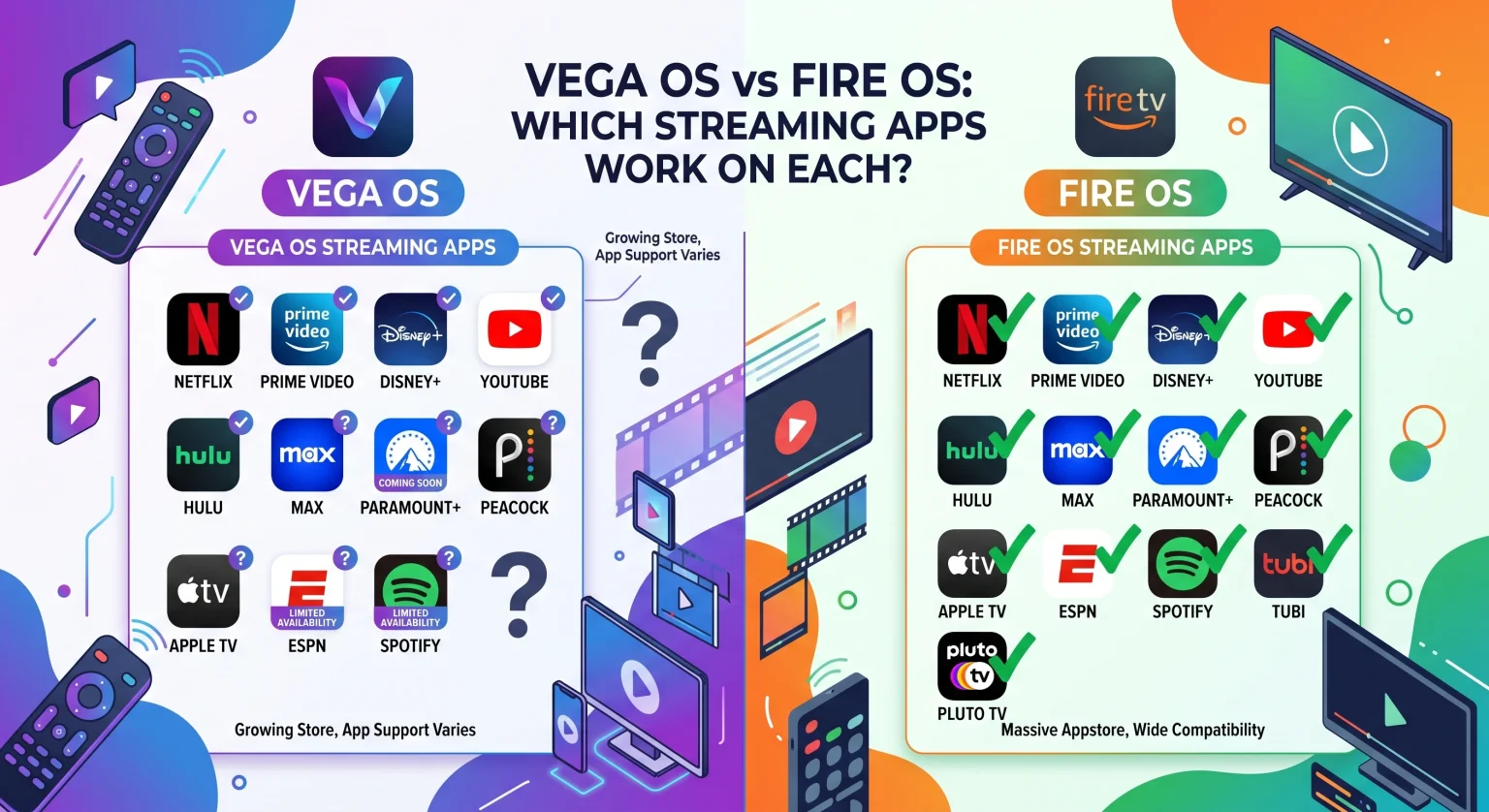
The Big Shift: From Android to Linux
For nearly a decade, Amazon relied on Android to power its streaming sticks. This made kompatibilitet med streamingappar incredibly vast and flexible. However, Amazon recently introduced Vega OS a lightweight, Linux-based system designed from the ground up.
While older devices like the Fire TV Stick 4K Max still run the classic software, newer models like the Fire TV Stick 4K Select have fully transitioned to Vega OS. This shift means developers now use React Native and web technologies instead of standard Android frameworks.
Faster Navigation: Vega cuts out background bloatware, offering lightning-fast app launches.
Lower Memory Usage: It is highly optimized for budget-friendly streaming sticks.
Closed Ecosystem: It removes the Google ecosystem dependency, giving Amazon tighter control over performance and security.
Vega OS vs Fire OS Apps in the United States
When examining Vega OS vs Fire OS apps, the most glaring difference lies in how they handle third-party software. In the United States, cord-cutters frequently rely on custom applications to access niche content or localized broadcasts.
With Fire OS, you have complete freedom. Because it is built on Android, if an app isn’t natively available in the Amazon Appstore, you can easily install it yourself. Vega OS, on the other hand, prioritizes speed and security over open customization. It strictly limits installations to the official Appstore, using a new VPKG format instead of traditional Android APKs.
Feature and Compatibility Comparison
Here is a quick breakdown of how these two operating systems handle your streaming needs:
| Funktion / Kapacitet | Fire OS (Android-baserat) | Vega OS (Linux-based) |
| Native App Ecosystem | Massive library of Android applications | Growing library built on React Native/Web |
| Sideloading Apps | Fully supported (allows custom APKs & IPTV) | Not supported (Closed ecosystem) |
| Cloud App Streaming | Apps run locally on the device | Legacy apps stream UI via AWS cloud containers |
| Performance Profile | Reliable, but prone to bloat and slowdowns | Lightning-fast, optimized for low memory |
| Integration i smarta hem | Standard Alexa functionality | Upgraded Alexa+ AI assistant |
Cloud App Streaming: Amazon's Compatibility Bridge
You might be wondering: What happens to my favorite apps if the developer hasn’t updated them for Vega OS? Amazon anticipated this with a feature called Cloud App Streaming.
If a native Vega application isn’t ready, Amazon runs the older Fire OS app in a dedicated AWS cloud container. It then streams the user interface directly to your Vega OS device.
Seamless Playback: Your device still decodes video and audio locally to ensure high-quality playback.
Data Security: All app data is encrypted on a per-user and per-device basis.
Limitations: Cloud streaming currently lacks local network access, meaning features like DLNA or playing content from a USB drive won’t work.
The Verdict on Sideloading and Third-Party Tools
If you are an enthusiast who loves using third-party streaming tools, Fire OS remains the undisputed champion. The ability to use Fire OS sideloading apps allows users to install custom ad-blockers, alternative web browsers, and specialized media players.
Vega OS trades that freedom for pure speed. It completely blocks APK installations. For the average viewer who simply wants to log into Netflix, Prime Video, or Peacock, Vega’s software limitations won’t be noticeable. In fact, the smoother, faster interface will feel like a massive upgrade.
Conclusion: Securing Your US Streaming Setup
Deciding between Vega OS vs Fire OS apps ultimately comes down to your streaming style. If you crave absolute control, customizability, and the ability to sideload, hunt down the older Android-based Fire OS devices while they are still available. But if you want a buttery-smooth, highly secure, and lightning-fast experience for standard US streaming services, Vega OS is the future of Amazon entertainment.
Ready to upgrade your home theater? [Check out the latest Fire TV device lineup on Amazon today] and choose the perfect operating system for your viewing needs!
Vanliga frågor (FAQ)
Can I still sideload apps on Vega OS?
No. Because Vega OS is built on a Linux foundation rather than Android, it does not support APK files. You cannot sideload third-party apps, custom launchers, or IPTV services on Vega OS devices.
Will my older Fire TV update to Vega OS?
Nej. Amazon does not update the underlying operating system of existing hardware. If your current Fire TV Stick runs Fire OS 7 or 8, it will continue running Android and will not automatically switch to Vega OS.
Which operating system is better for streaming apps?
It depends on your needs. Vega OS is significantly faster, leaner, and provides quicker app launches for mainstream services. Fire OS is better if you require a massive library of niche applications or want the freedom to install third-party software.