
Many television buyers look for premium features when they purchase a new Smart TV. Dolby Vision is one of the most popular premium television features. Users often want to know if Dolby Vision improves the picture quality of an IPTV subscription.
Dolby Vision is a dynamic High Dynamic Range (HDR) format. This format adjusts brightness levels and color levels for every single frame of a video. Premium streaming applications like Netflix and Disney+ use Dolby Vision frequently. However, IPTV services deliver video using different methods. The importance of a Dolby Vision IPTV setup depends entirely on the type of video you want to watch.
This article explains how Dolby Vision works, how IPTV applications process HDR video, and whether you truly need Dolby Vision for your daily television viewing.
nsectetur adipiscing elit. Ut elit tellus, luctus nec ullamcorper mattis, pulvinar dapibus leo.
Quick Answer
Dolby Vision has very limited importance for live IPTV channels. Most television networks broadcast live television in Standard Dynamic Range (SDR). Therefore, a live television stream will not use Dolby Vision metadata.
However, Dolby Vision does matter if your IPTV service includes a Video on Demand (VOD) movie library with specific Dolby Vision video files. For live sports and news, standard 4K resolution and a high refresh rate are much more important than Dolby Vision.
What Is Dolby Vision?
To understand if Dolby Vision matters for IPTV, you must understand how the technology works.
Televisions traditionally display video in Standard Dynamic Range (SDR). SDR limits the maximum brightness and the maximum color range that a television can show.
High Dynamic Range (HDR) increases these limits. HDR allows a television to show brighter white colors, darker black colors, and more vivid colors.
There are several different HDR formats. HDR10 is the standard format. HDR10 applies one static brightness setting to an entire movie.
Dolby Vision is a premium dynamic HDR format. Dolby Vision uses dynamic metadata. This metadata sends specific instructions to the television for every single frame of the video. If a movie scene shows a dark cave, Dolby Vision tells the television to lower the brightness. If the next scene shows a bright sun, Dolby Vision tells the television to increase the brightness immediately. This frame-by-frame adjustment creates a highly realistic picture.
How Dolby Vision Works With IPTV
An IPTV service delivers video over the internet using a playlist. Users play this playlist using an IPTV application.
For Dolby Vision to work correctly on an IPTV application, three separate things must happen at the same time:
The video source must contain Dolby Vision metadata. If the original video file does not have Dolby Vision data, the television cannot show Dolby Vision.
The IPTV application must support Dolby Vision playback. The media player inside the IPTV application must be able to read the Dolby Vision data.
The television hardware must support Dolby Vision. If the television does not have a Dolby Vision license, the television will ignore the Dolby Vision data.
If any of these three requirements are missing, the video will not play in Dolby Vision. The video will usually fall back to standard HDR10 or standard SDR. Sometimes, if the player fails to read the data correctly, the screen will show incorrect purple and green colors.
Live IPTV Channels vs Video on Demand
The most important factor in the Dolby Vision IPTV discussion is the difference between live television and Video on Demand (VOD).
Live Television Channels
Dolby Vision does not matter for live television channels. Television networks rarely broadcast live channels in Dolby Vision. Most global television networks broadcast their signals in 1080p SDR or 720p SDR. Some premium networks broadcast in 4K resolution, but they usually use standard HDR10 or a different format called HLG (Hybrid Log-Gamma). Because the original live broadcast does not contain Dolby Vision data, your IPTV service cannot deliver Dolby Vision data for that channel.
Video on Demand (VOD)
Dolby Vision can matter for Video on Demand content. Many IPTV services provide a library of saved movies and television series. If the IPTV provider uploads a movie file that contains Dolby Vision metadata, you can watch that movie in Dolby Vision. This provides a massive improvement in picture quality. However, you must use a compatible IPTV application and a compatible Smart TV.
Comparison: SDR vs HDR10 vs Dolby Vision for IPTV
This comparison table explains how different formats affect IPTV viewing.
| Feature | SDR (Standard Dynamic Range) | HDR10 | Dolby Vision |
| Brightness control | Static (Basic) | Static (One setting) | Dynamic (Frame-by-frame) |
| Color accuracy | Standard | High | Very High |
| Live TV usage | Very common (Most channels) | Rare (Some 4K channels) | Almost never used |
| VOD movie usage | Common | Very common | Common for premium movies |
| Hardware requirement | All televisions | All 4K HDR televisions | Specific licensed TVs only |
Smart TV Brands and Dolby Vision Support
If you want a Dolby Vision IPTV experience for movies, you must buy a television that supports the Dolby Vision format. Not all television manufacturers pay for the Dolby Vision license.
Sony and LG Televisions
Sony and LG support Dolby Vision on most of their mid-range and premium televisions. If you use a Sony BRAVIA television or an LG OLED television, the television hardware can process Dolby Vision metadata perfectly.
Samsung Televisions
Samsung televisions do not support Dolby Vision. Samsung created a competing dynamic HDR format called HDR10+. If you play a Dolby Vision movie on a Samsung television, the television will not use the dynamic metadata. The Samsung television will play the movie in standard HDR10 instead. This still looks very good, but it is not true Dolby Vision.
Android TV and Google TV Streaming Devices
Many users play TV Shadow IPTV using external streaming devices. Devices like the NVIDIA Shield TV Pro, Amazon Fire TV Stick 4K Max, and Chromecast with Google TV support Dolby Vision. However, you must still connect these devices to a television that supports Dolby Vision.
IPTV Application Compatibility
Having the right television is only one part of the process. The IPTV application must also process the Dolby Vision video file correctly.
Most modern IPTV applications use a video engine called ExoPlayer. ExoPlayer is a media player created by Google. Recent versions of ExoPlayer can process Dolby Vision video files.
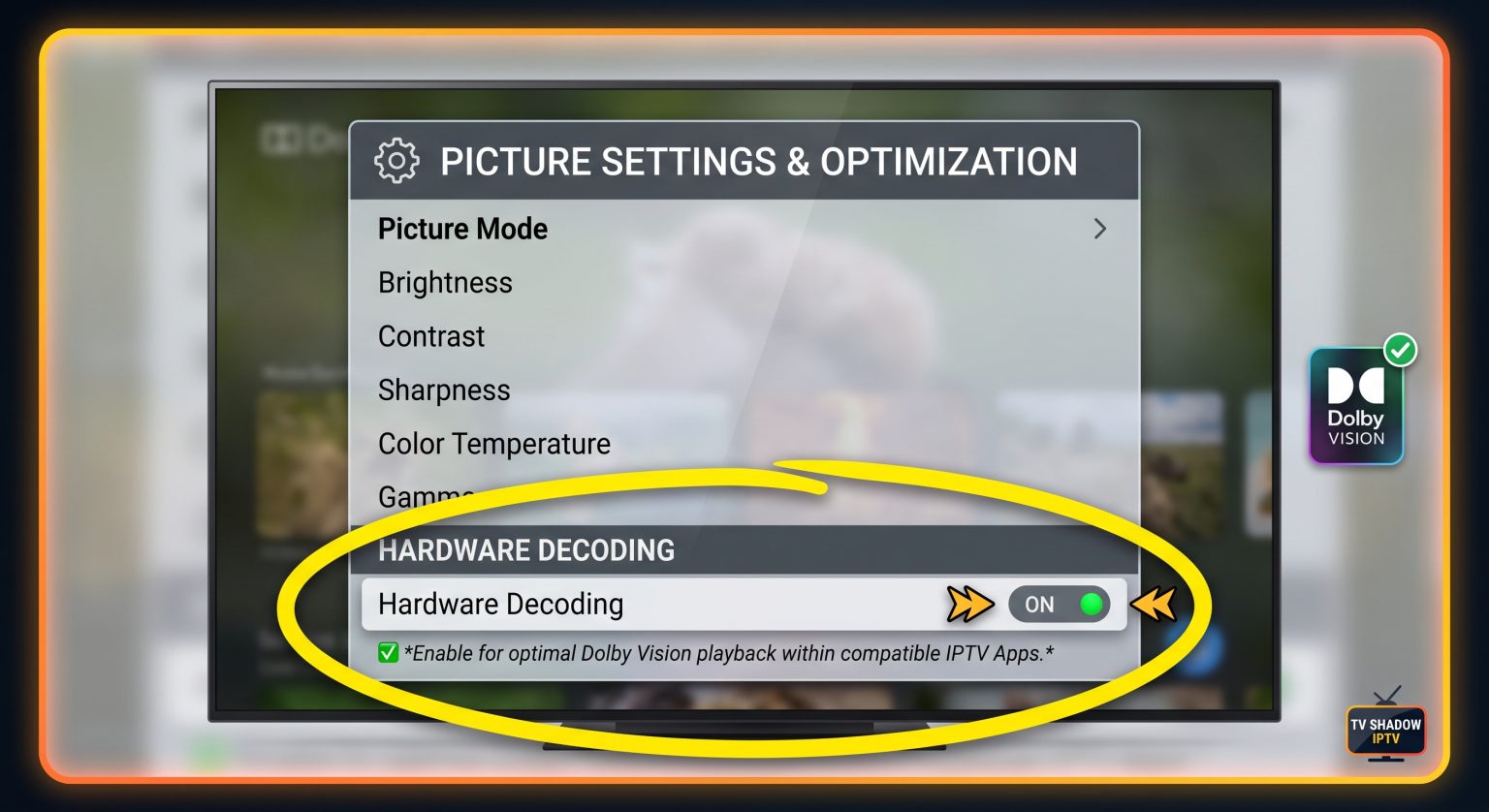
If you use a popular application like TiviMate or Smarters Pro, you should check the player settings. You may need to enable hardware decoding. Hardware decoding forces the television processor to handle the video file. This allows the television to detect the Dolby Vision data and activate the Dolby Vision picture mode.
If your IPTV application uses an old video player, a Dolby Vision movie might show a black screen. It might also show distorted purple and green colors. If you see purple and green colors, you must switch to a different media player engine inside your IPTV application settings.
Live Football and Sports Viewing
Many people buy TV Shadow IPTV specifically to watch live football and other live sports.
For live sports, Dolby Vision does not matter at all. Sports broadcasters do not use Dolby Vision for live matches. When sports broadcasters use HDR, they almost always use HLG (Hybrid Log-Gamma). HLG is a specific HDR format designed specifically for live television broadcasts.
If you want the best possible picture quality for live football, you should ignore Dolby Vision. Instead, you should focus on other television specifications.
Motion handling is the most important feature for live sports. A television with excellent motion handling will keep the football sharp when the camera moves quickly.
Refresh rate is also extremely important. A 120Hz television will display fast movement much better than a 60Hz television. If you are comparing televisions for sports, our guide to 60Hz vs 120Hz TV for Live Football explains why the refresh rate changes the viewing experience.
Furthermore, the type of screen panel affects sports viewing. OLED televisions have very fast pixel response times. Mini-LED televisions offer very high brightness for daytime viewing. You can read more about this in our guide comparing OLED vs Mini-LED for Live Football.
Why Does My IPTV Stream Look Dark?
Sometimes, users try to force their television to use HDR or Dolby Vision settings on standard live IPTV channels. This usually causes poor picture quality.
If you force an SDR video stream into an HDR picture mode, the television will map the colors incorrectly. The picture will often look very dark. The colors might look unnatural or too orange.
You should leave your television picture settings on “Auto”. When the television receives an SDR live channel, the television should use the standard SDR picture mode. When the television receives a true Dolby Vision VOD movie, the television will switch to Dolby Vision mode automatically.
If a low-quality stream looks bad on your expensive new television, the television is probably trying to add too much digital processing. You can learn how to fix this issue in our article explaining Why Does IPTV Look Blurry on a New 4K TV?.
Conclusion
A Dolby Vision IPTV setup provides incredible picture quality for Video on Demand movies. If your IPTV provider offers 4K movies with Dolby Vision metadata, a compatible television will display perfect contrast and highly vivid colors.
However, Dolby Vision does not matter for live television channels. Live news, live television series, and live football matches do not use the Dolby Vision format. For daily live television viewing, standard 4K resolution and smooth motion handling are far more important.
When you choose a Smart TV for TV Shadow IPTV, you should consider what you watch the most. If you watch thousands of VOD movies, buying an LG or Sony television with Dolby Vision support is a smart choice. If you watch mostly live sports, you should focus on a 120Hz refresh rate instead of worrying about Dolby Vision.
Frequently Asked Questions (FAQ)
Does Samsung TV support Dolby Vision for IPTV?
No. Samsung televisions do not support Dolby Vision. Samsung uses a different dynamic HDR format called HDR10+. If you play a Dolby Vision video on a Samsung television, the television will show standard HDR10 instead.
Why do Dolby Vision movies look purple and green on my IPTV app?
This happens when the IPTV application cannot process the specific Dolby Vision profile. The application fails to decode the color data. To fix this, open your IPTV application settings and change the internal media player (for example, change from VLC to ExoPlayer), or use an external player application.
Do I need Dolby Vision to watch live football?
No. Television networks do not broadcast live football in Dolby Vision. Networks broadcast live football in SDR or HLG formats. A high refresh rate (120Hz) is much more important for live football than Dolby Vision.
Does TV Shadow IPTV have Dolby Vision content?
IPTV services deliver the files that are uploaded to the servers. Live television channels will be in standard formats. The Video on Demand (VOD) library may contain Dolby Vision movie files, depending on the specific movie release.
Is HDR10 the same as Dolby Vision?
No. HDR10 is a static format. HDR10 applies one brightness rule to the entire movie. Dolby Vision is a dynamic format. Dolby Vision changes the brightness rules for every single frame of the video, which creates a more accurate picture.
Which IPTV apps support Dolby Vision?
Applications that use modern versions of ExoPlayer generally support Dolby Vision pass-through. Popular applications like TiviMate and IPTV Smarters Pro can play Dolby Vision if you enable hardware decoding and use a compatible television.