
Al Aoula is the primary public television channel of Morocco. The channel is operated by the Société Nationale de Radiodiffusion et de Télévision (SNRT), which is Morocco’s national public broadcaster. Al Aoula broadcasts daily news in Arabic and French, Moroccan dramas, cultural programs, documentaries, and selected sports events.
Many viewers living in Europe want to watch Al Aoula live Europe broadcasts on their television, smartphone, or computer. In 2026, viewers in Europe have four main ways to access Al Aoula: the official SNRT Live platform, free-to-air satellite television, European internet provider TV boxes, and Internet Protocol Television (IPTV) applications on Smart TVs. Each method has different equipment requirements, costs, and picture quality levels.
Snel antwoord
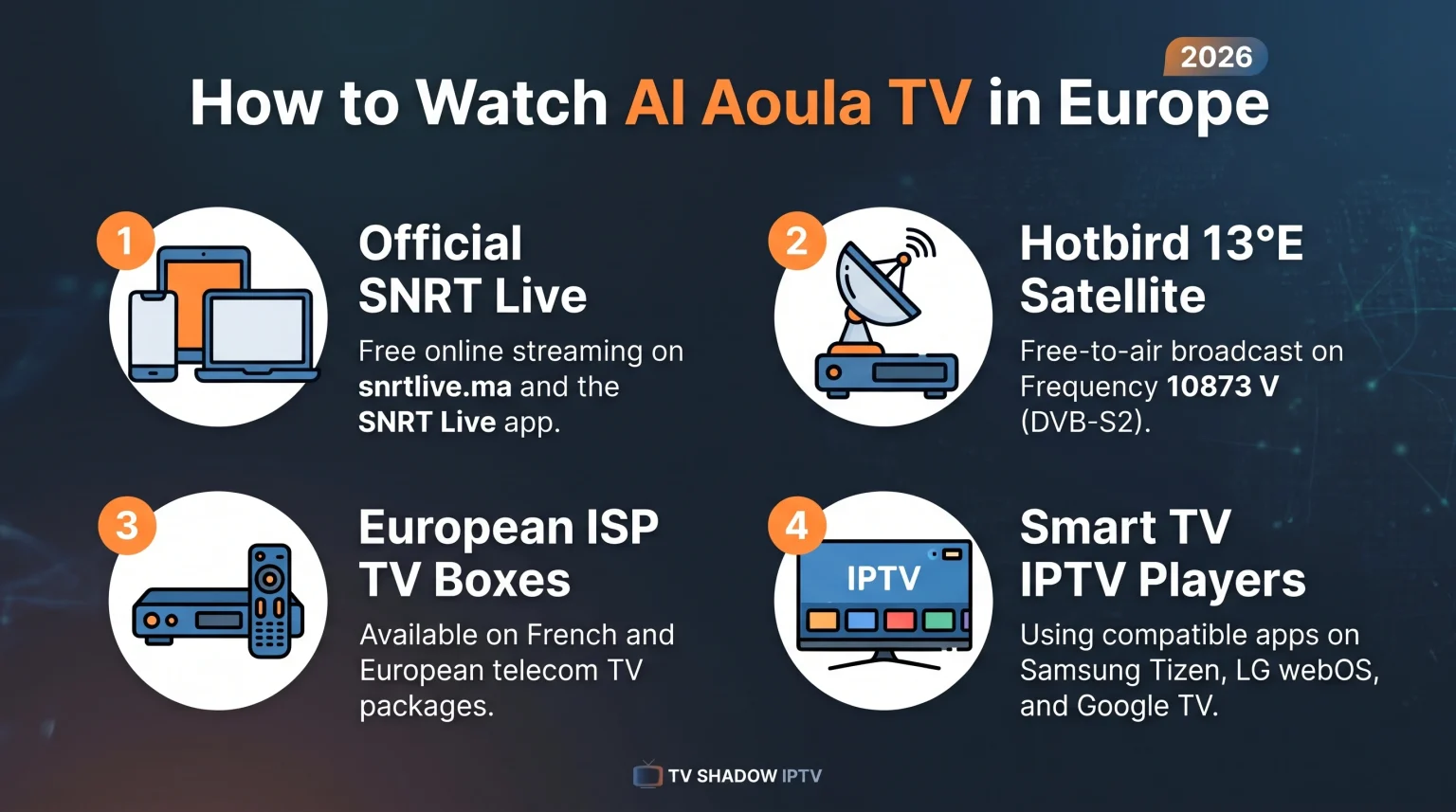
To watch Al Aoula TV in Europe in 2026, you can use the official SNRT Live website or mobile app for free internet streaming. If you prefer traditional television without internet dependency, you can receive Al Aoula Inter HD free-to-air via the Hotbird 13.0° East satellite. Viewers in France and several other European countries can also access Al Aoula through their internet service provider (ISP) television box. For viewing on a Smart TV without a satellite dish, an IPTV player application with a compatible playlist is another common option.
Method 1: Watch Al Aoula via the Official SNRT Live Platform
The simplest way to watch Al Aoula live Europe streams on a phone, tablet, or computer is through the official SNRT Live service. SNRT operates this digital platform directly for viewers in Morocco and abroad.
How to Access SNRT Live
Web browser: Visit the official SNRT Live website (snrtlive.ma) on a computer or mobile browser. Select Al Aoula from the channel list to start the live stream.
Mobile application: Download the official SNRT Live application from the Google Play Store for Android devices or the Apple App Store for iOS devices.
YouTube: The official Al Aoula YouTube channel (@AlAoulaTV) uploads daily Arabic and French news bulletins, as well as selected talk shows and clips.
Limitations of SNRT Live in Europe
SNRT Live is free to use, which makes SNRT Live convenient for daily news and general Moroccan programming. However, some international sports broadcasts or licensed foreign movies may be geo-restricted outside Morocco due to regional broadcasting rights. In addition, the SNRT Live app is designed primarily for smartphones and tablets rather than Smart TV operating systems. To watch SNRT Live on a large television, you may need to cast the screen from your phone using Google Chromecast or Apple AirPlay.
Method 2: Watch Al Aoula via Satellite in Europe (Hotbird 13°E)
Satellite television remains a reliable method for watching Moroccan public channels across Europe. Al Aoula broadcasts an international version called Al Aoula Inter HD free-to-air on the Hotbird satellite system at 13.0° East. Free-to-air means that no monthly subscription or decryption card is required to receive the signal.
Hotbird 13.0° East Satellite Parameters for Al Aoula Inter HD
To tune Al Aoula Inter HD on a European satellite receiver or a Smart TV with a built-in satellite tuner, use the following technical parameters:
Satellite: Hotbird 13F / 13G (13.0° East)
Frequency: 10873 MHz
Polarization: Vertical (V)
Symbol Rate: 27500 kS/s
Forward Error Correction (FEC): 3/4
Broadcast Standard: Digital Video Broadcasting – Satellite – Second Generation (DVB-S2)
Modulation: 8PSK
Resolution: High Definition (HD), 1920 × 1080 pixels
Satellite broadcasters occasionally update frequencies or transmission parameters. If Al Aoula Inter HD disappears from your receiver, run a new channel scan on Hotbird 13.0° East. Keep in mind that older receivers that only support DVB-S (the first generation standard) cannot receive DVB-S2 channels.
Pros and Cons of Satellite Reception
Satellite reception does not use your home internet bandwidth, so the picture does not buffer when other people use your Wi-Fi network. However, many European apartment buildings do not allow residents to install a satellite dish on balconies or roofs. In those situations, internet-based viewing methods are necessary.
Method 3: Watch Al Aoula via European ISP and Cable TV Boxes
In European countries with large Moroccan communities, local internet service providers (ISPs) and cable operators often include Al Aoula in their standard television packages or international add-on packs.
For example, in France, Al Aoula (formerly listed as TVM Europe) is available directly on major ISP television boxes:
Orange (Livebox) and Sosh: Channel 504
SFR and RED by SFR: Channel 750
Bouygues Telecom (Bbox): Channel 635
Free (Freebox): Channel 1065
Availability in Germany, Belgium, the Netherlands, Spain, Italy, Sweden, and other European countries depends on the specific cable or telecom provider. Check your local provider’s international channel list to confirm whether Al Aoula is included in your current television subscription.
Comparison of Ways to Watch Al Aoula in Europe
The table below compares the four main ways to watch Al Aoula live Europe broadcasts in 2026.
| Functie | SNRT Live (Official) | Hotbird 13°E Satellite | European ISP TV Box | IPTV Player on Smart TV |
| Equipment needed | Phone, tablet, or computer | Satellite dish and DVB-S2 receiver | ISP television box | Smart TV or streaming box |
| Internet required | Ja | Nee | Ja | Ja |
| Monthly cost | Gratis | Free after dish installation | Included in ISP plan or add-on pack | Depends on IPTV app and service |
| Picture resolution | Adaptive HD / SD | Full HD (1080p) on Al Aoula Inter HD | Standard Definition (SD) or HD | Depends on stream source |
| Geo-restrictions | Applies to some licensed events | Free-to-air across Europe | Managed by local ISP | Depends on channel source |
| Ease of setup | Very simple | Requires dish alignment | Simple for existing subscribers | Requires app setup and playlist |
Method 4: Watching Al Aoula with IPTV on a Smart TV
Many households in Europe cannot install a satellite dish and do not have a local ISP television box that carries Moroccan channels. For these viewers, using an Internet Protocol Television (IPTV) player application on a Smart TV is a practical alternative.
Op TV Shadow IPTV, we often see viewers ask how IPTV players work on different television brands. Understanding Smart TV compatibility helps you avoid setup problems before you buy a new television or install an application.
IPTV App Availability by Smart TV Operating System
IPTV player availability depends on your country, television model, model year, operating-system version, and app-store policy. Not every IPTV application works on every Smart TV.
Samsung Tizen: Samsung Smart TVs use the Tizen operating system and the Samsung Apps store. Samsung Tizen does not support Android applications from Google Play. Several dedicated IPTV players are available in the Samsung Apps store, though selection varies by country.
LG webOS: LG Smart TVs use the webOS operating system and the LG Content Store. Like Samsung Tizen, LG webOS does not run Android applications natively, but LG webOS offers several native IPTV player applications.
Sony BRAVIA and TCL (Google TV / Android TV): Televisions running Google TV or Android TV use the Google Play Store. These televisions generally provide access to a wide range of IPTV player applications.
If you are comparing television operating systems before buying a new screen, our guide to Het beste besturingssysteem voor smart-tv’s voor IPTV in 2026: Tizen vs Google TV vs webOS explains the differences between Tizen, Google TV, and webOS. You can also compare major television brands in our overview of De beste smart-tv's voor IPTV in 2026: Samsung, Sony, LG en TCL vergeleken.
Note: TV Shadow IPTV is an independent website and has no official relationship or affiliation with Samsung, Sony, LG, Google, or SNRT.
Technical Features to Check in an IPTV Player
When choosing an IPTV player application for watching Moroccan and European channels on a Smart TV, check for these four technical features:
M3U and Xtream Codes compatibility: Most IPTV playlists use either an M3U link (a standard multimedia playlist file) or Xtream Codes (a login format using a server address, username, and password). Confirm that your chosen IPTV player supports the format you use.
Electronic Program Guide (EPG) support: An Electronic Program Guide (EPG) displays current and upcoming television programs on screen. EPG support makes it easier to find news bulletins and prime-time shows on Al Aoula without checking external websites.
Remote-control usability: Television applications should be easy to navigate using standard directional buttons on your TV remote control. Applications designed for touchscreens are difficult to use on a television.
External streaming devices: If your older Smart TV has limited app-store support or slow menus, you can connect an external streaming device (such as a Google TV streaming box or an Apple TV) to an HDMI port.
Picture Quality and Live Sports Viewing Tips
Al Aoula broadcasts Moroccan national news, cultural festivals, and selected football matches, including domestic Moroccan competitions and national team coverage when broadcasting rights apply. When watching live sports or fast-moving broadcasts over the internet in Europe, several technical factors affect picture quality.
Internet Connection: Ethernet vs. Wi-Fi
A wired Ethernet cable between your internet router and your Smart TV provides a more stable connection than Wi-Fi. Wi-Fi signals can drop or fluctuate when walls, floors, or neighboring wireless networks interfere with the signal. For live television and sports, a stable connection is more important than maximum download speed.
TV Upscaling on 4K Televisions
Most modern televisions sold in Europe have a 4K Ultra High Definition (UHD) screen with 3840 × 2160 pixels. However, Al Aoula Inter HD broadcasts in 1080p Full HD, and many internet streams use 720p or 1080p resolution. Your television uses a process called opschaling to stretch lower-resolution video to fit a 4K screen.
Good upscaling keeps text and faces sharp, while weak upscaling can make a live broadcast look soft. To learn how television processors handle lower-resolution streams, read our guide on Wat is tv-upscaling en helpt het bij IPTV?.
Motion Handling and Picture Settings
For live football or fast-moving broadcasts, check your television’s picture settings:
Turn off heavy noise-reduction filters if the image looks overly soft.
Test the motion-smoothing setting on your TV; a low setting can reduce blur on fast camera pans, while a high setting can create visual artifacts around moving players.
Remember that picture quality always depends on the original input signal quality. A low-bitrate internet stream will not look sharp even on an expensive 4K television.
Conclusie
Watching Al Aoula live Europe broadcasts in 2026 is straightforward once you choose the method that fits your home setup. The official SNRT Live website and mobile app are the fastest free options for smartphones and computers. Satellite reception via Hotbird 13.0° East offers reliable Full HD viewing without using internet bandwidth, provided you can install a dish.
If you live in a country where local internet providers include Al Aoula on their TV boxes, that option requires no extra equipment. For viewers who prefer watching on a Smart TV without a satellite dish or cable box, choosing a compatible Smart TV operating system and a reliable IPTV player application provides flexible access. Resources on TV Shadow IPTV can help you compare Smart TV platforms and optimize your television settings for live streaming.
Veelgestelde vragen (FAQ)
Is Al Aoula free to watch in Europe?
Yes, Al Aoula is free to watch in Europe through official channels. You can stream Al Aoula for free on the official SNRT Live website and mobile application, or receive Al Aoula Inter HD free-to-air via the Hotbird 13.0° East satellite.
What is the satellite frequency for Al Aoula in Europe in 2026?
Al Aoula Inter HD broadcasts on the Hotbird 13.0° East satellite at frequency 10873 MHz, Vertical polarization, Symbol Rate 27500, FEC 3/4, using the DVB-S2 / 8PSK standard. You need a DVB-S2 compatible satellite receiver to tune this channel.
Why does Al Aoula sometimes block sports matches online in Europe?
Online streams on SNRT Live may block certain international sports matches or foreign films outside Morocco because SNRT only holds broadcasting rights for Moroccan territory. Regional licensing agreements require broadcasters to restrict internet streams outside their licensed area.