
Sie können sich nicht entscheiden zwischen den Fire TV-Stick 4K Max und das neue 4K Select für Ihr Wohnzimmer? Wenn Sie in den USA auf IPTV-Dienste setzen, ist die Wahl der richtigen Hardware im Jahr 2026 entscheidend. Schauen wir uns die ultimative Lösung einmal genauer an Firestick 4K Max vs. 4K Select IPTV Vergleich, damit Sie Live-Sport und Unterhaltungsprogramme streamen können, ohne dass das gefürchtete Ladesymbol erscheint.
Warum der US-amerikanische Streaming-Markt bessere Hardware benötigt
In den USA steigen die Internetgeschwindigkeiten, doch ebenso steigen die Bandbreitenanforderungen von 4K-Streaming-Plattformen. Bei der Bewertung eines neuen Streaming-Geräts hängt der Unterschied zwischen ruckelnden Menüs und butterweichem Kanalwechsel von der Prozessorleistung und einer stabilen Netzwerkverbindung ab. Für Live-TV-Streams ist leistungsstarke Hardware kein Luxus mehr, sondern eine Notwendigkeit.
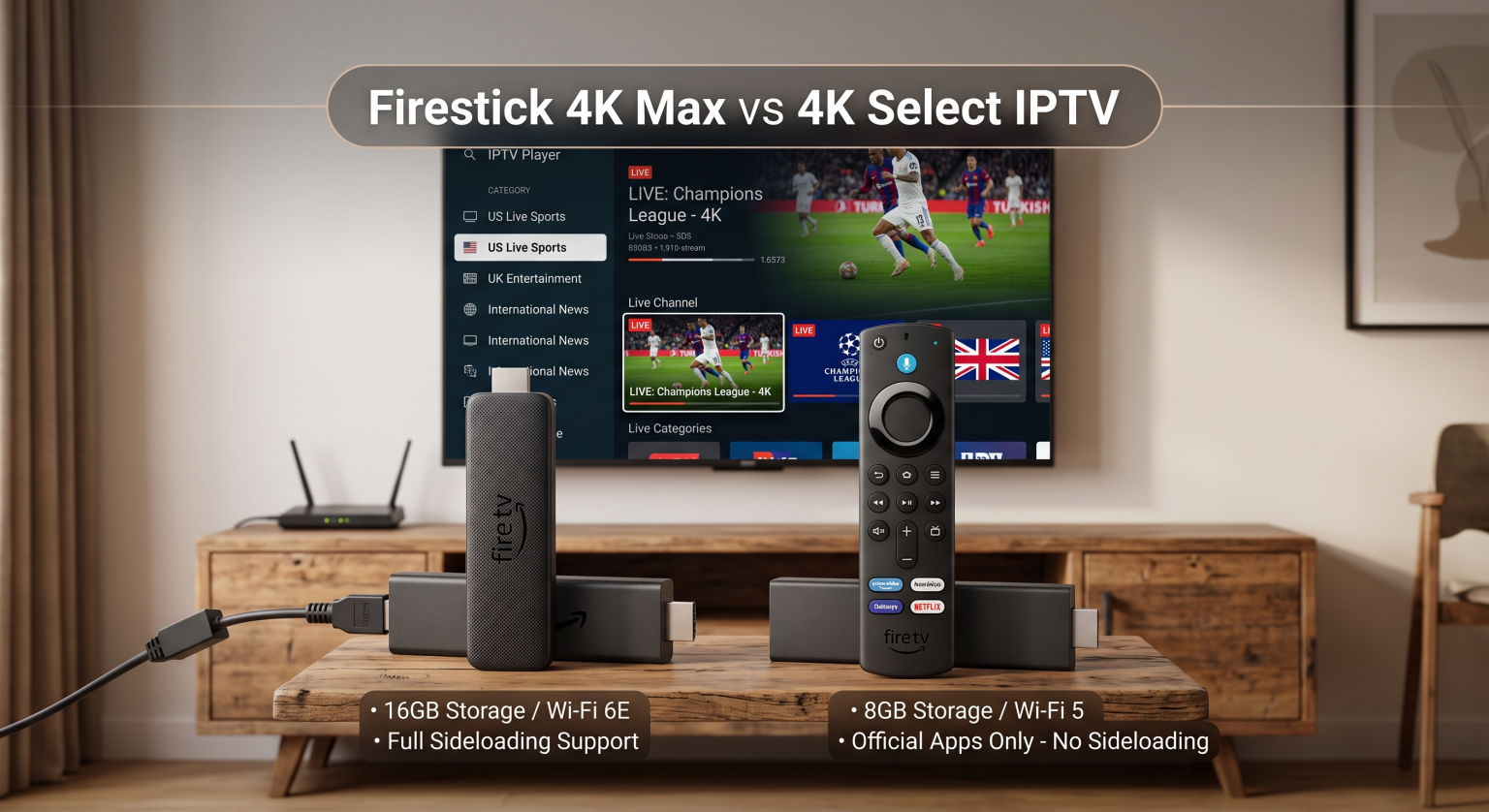
Wesentliche Unterschiede: Firestick 4K Max vs. 4K Select – IPTV-Leistung
Beim Einsetzen des Firestick 4K Max vs. 4K Select IPTV Beim direkten Vergleich der Funktionen spielen Speicher und Betriebssysteme eine entscheidende Rolle. Der 4K Max läuft unter Fire OS, das auf einem Android-Framework basiert und IPTV-Apps von Drittanbietern problemlos unterstützt. Der 4K Select nutzt jedoch Amazons neues, auf Linux basierendes Vega-Betriebssystem, das die Möglichkeiten zur Installation von Software stark einschränkt.
Sideloading und Unterstützung von Apps von Drittanbietern
Für überzeugte „Cord-Cutter“ ist die Möglichkeit, einen IPTV-Player per Sideloading zu installieren, unverzichtbar. Der 4K Max bietet Ihnen von Anfang an volle Freiheit bei der Installation benutzerdefinierter APKs. Umgekehrt beschränkt das Vega-Betriebssystem des 4K Select den Nutzer streng auf zugelassene Anwendungen aus dem Amazon Appstore, wodurch das Gerät für individuelle Live-TV-Konfigurationen praktisch unbrauchbar ist.
Geschwindigkeit, Speicherplatz und WLAN-Funktionen
Die Funktionen des 4K Max 16 GB Speicherplatz, 2 GB RAM und blitzschnelles Wi-Fi 6E. Das Select-Modell spart an einigen Stellen, um die Kosten zu senken, und bietet lediglich 8 GB Speicherplatz, 1 GB RAM und Standard-WLAN 5. Bei anspruchsvollen HD-Übertragungen verhindern der zusätzliche Arbeitsspeicher und die überlegene WLAN-Verbindung des Max Verzögerungen und Ruckler.
Direkter Vergleich: 4K Max vs. 4K Select
| Funktionen / Technische Daten | Amazon Fire TV Stick 4K Max | Amazon Fire TV Stick 4K Select |
| Betriebssystem | Fire OS (basiert auf Android, unterstützt das Sideloading) | Vega OS (Linux-basiert, kein Sideloading) |
| Arbeitsspeicher und Speicherplatz | 2 GB RAM / 16 GB Speicherplatz | 1 GB RAM / 8 GB Speicherplatz |
| WLAN-Technologie | Wi-Fi 6E (Tri-Band) | Wi-Fi 5 (Dualband) |
| HDR & Audio | Dolby Vision, HDR10+, Dolby Atmos | HDR10+, Dolby Audio Passthrough |
Welches Streaming-Gerät ist in US-Haushalten am beliebtesten?
Für Nutzer in den gesamten USA, die sich ein makelloses Fernseherlebnis wünschen, liegt der Sieger auf der Hand. Wenn Sie eigene Streaming-Plattformen nutzen, ist der 4K Max aufgrund seines offenen Betriebssystems und seines internen Speichers von 16 GB die einzige brauchbare Option. Der 4K Select ist ausschließlich für einfaches Streaming auf Einstiegsniveau über offizielle Apps wie Netflix und Prime Video konzipiert.
Das endgültige Urteil
Ganz gleich, ob Sie in einer überfüllten Wohnung in New York oder in einem Haus auf dem Land in Texas wohnen – eine optimale Internetverbindung ist für den Verzicht auf Kabelfernsehen in den USA unerlässlich. Im ultimativen Firestick 4K Max vs. 4K Select IPTV In jeder Situation bietet der 4K Max die Leistung, Flexibilität und Wi-Fi 6E-Fähigkeiten, die für moderne Unterhaltung erforderlich sind.
Sind Sie bereit, Ihr Home-Entertainment-Erlebnis aufzuwerten? Holen Sie sich noch heute den Fire TV Stick 4K Max und erleben Sie blitzschnelles Live-TV-Streaming ohne Einschränkungen!
Wenn Sie sich die neuen Betriebssystem-Einschränkungen beim Select-Modell genauer ansehen möchten, lesen Sie diesen Artikel Vega OS im Praxistest. Diese praktische Anleitung veranschaulicht anschaulich die neue Benutzeroberfläche und erklärt, warum Sie nicht ohne Weiteres nicht zugelassene Software von Drittanbietern auf dem neuen Gerät installieren können.
Häufig gestellte Fragen (FAQ)
Kann ich auf dem Fire TV Stick 4K Select Apps per Sideloading installieren?
Nein. Der Fire TV Stick 4K Select läuft mit dem neuen Vega-Betriebssystem, das die Installation von Android-APKs von Drittanbietern vollständig unterbindet.
Ist der Firestick 4K Max besser für IPTV geeignet?
Ja. Mit 16 GB Speicherplatz, 2 GB RAM und der traditionellen Fire-OS-Unterstützung für das Sideloading ist das 4K Max beim Live-TV-Streaming deutlich überlegen.
Unterstützt der 4K Select Dolby Atmos?
Nein, der 4K Select unterstützt nur die grundlegende Dolby-kodierte Audio-Durchleitung; die native Unterstützung für Dolby Atmos und Dolby Vision, wie sie beim 4K Max vorhanden ist, fehlt ihm.