
Have you finally decided to cut the cord and ditch expensive cable bills? If you are exploring the world of internet television, you’ve probably realized by now that having a reliable media player is just as crucial as finding a good streaming service. Enter HotPlayer a sleek, lightning-fast, and incredibly intuitive media player that is quickly becoming a favorite for streaming enthusiasts.
Whether you’re trying to load a massive M3U playlist or connect via Xtream Kodları, getting your live TV, movies, and series onto your screen shouldn’t require a degree in computer science. Here is everything you need to know about HotPlayer, from its standout features to a quick step-by-step setup guide.
What Actually is HotPlayer?
Let’s clear the air right away: HotPlayer is a pure media player. It does not come pre-loaded with live channels, movies, or subscriptions. You are entirely responsible for bringing your own content (often referred to as BYOC). Think of it as an empty, high-performance sports car you just need to provide the fuel.
By acting strictly as a player, it remains perfectly legal and widely available across major app stores, including the Samsung Tizen TV Store, LG Content Store, Roku, Google Play, and the Apple App Store.
Why Cord-Cutters Are Flocking to It
With dozens of IPTV oynatıcılar flooding the market, standing out takes more than just a basic interface. Here is why this specific app is dominating search trends for the “best IPTV player”:
Universal Compatibility: It effortlessly handles standard M3U files, M3U8 links, and Xtream Codes API.
Lightning-Fast Navigation: The interface is snappy. Switching between live TV, VOD (Video on Demand), and series happens without that annoying buffer lag that plagues older apps.
Multi-Platform Reach: You aren’t locked into one ecosystem. You can use it on Windows, macOS, iOS, Apple TV, Android boxes, and major Smart TVs.
Robust EPG Support: A solid Electronic Program Guide (TV guide) makes or breaks the viewing experience. HotPlayer integrates your EPG seamlessly so you always know exactly what’s airing.
Ebeveyn Kontrolleri: You can easily lock or hide specific adult categories or channels behind a custom PIN, keeping your household viewing safe.
MAC Address Locking: A unique security feature that lets you lock your TV’s MAC address in the app settings, preventing someone else from hijacking or resetting your playlist.
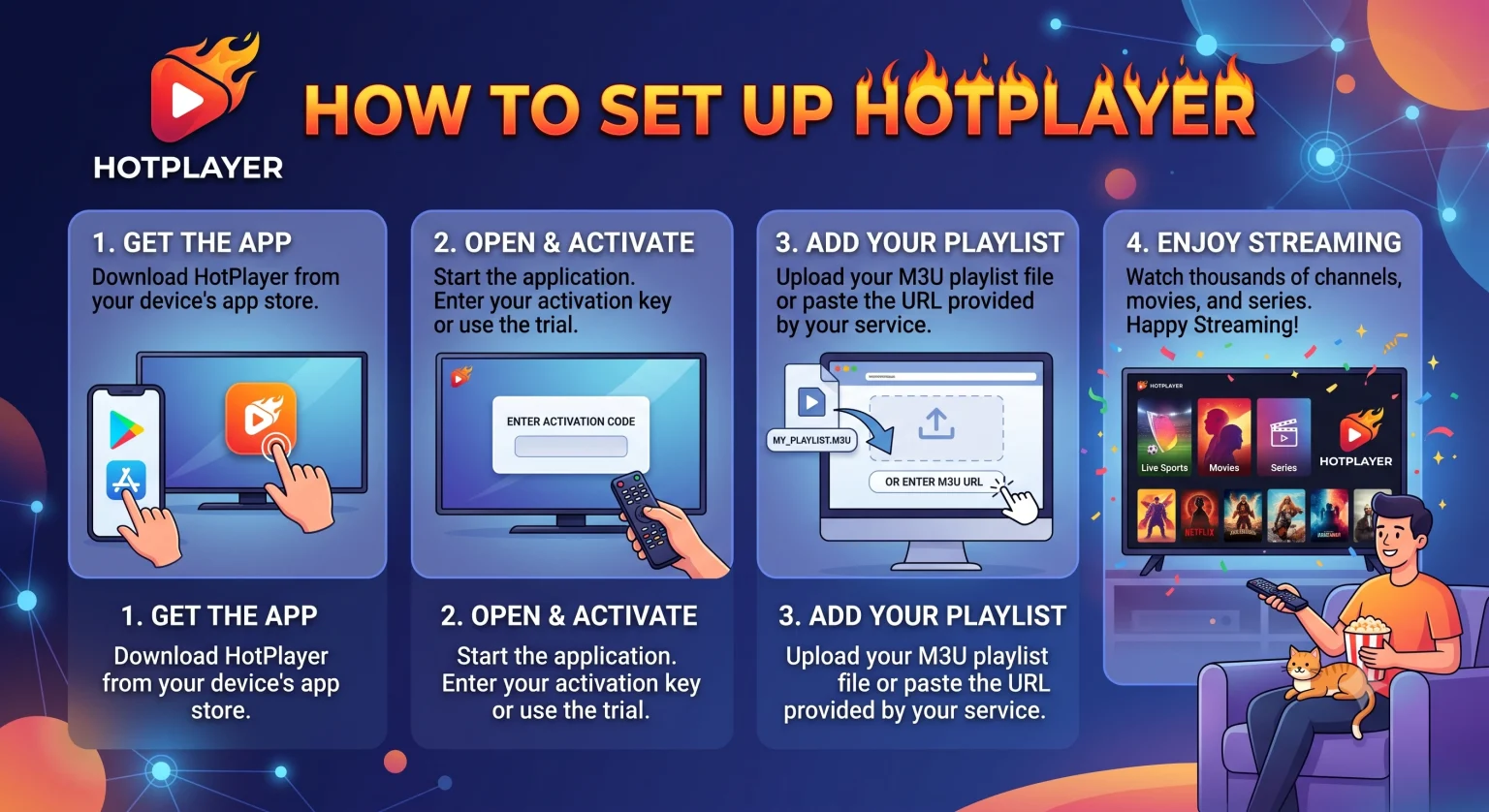
How to Set Up HotPlayer (The Easy Way)
Getting your playlist running takes less than five minutes. Just follow these steps:
Download the App: Search for “HotPlayer” on your device’s respective app store and hit install.
Locate Your MAC Address: Open the application. The home screen will clearly display your device’s unique MAC address (a mix of letters and numbers). Leave this screen open.
Upload Your Playlist: Hop onto your computer or smartphone and visit the official website (hotplayer.app). Navigate to the “Upload List” tab.
Enter Your Details: Type in your TV’s MAC address and paste your M3U link or Xtream Codes credentials provided by your IPTV aboneliği service.
Restart and Watch: Restart the app on your TV. Your live channels, movies, and TV shows will now be neatly categorized, complete with posters and metadata, ready to stream.
Let's Talk Pricing
Nobody likes hidden subscription fees or surprise charges. HotPlayer operates on a highly transparent, device-based licensing model. After your initial 7-day free trial to test the waters, you have two straightforward options to activate your device:
1-Year Activation: Roughly €5.99 (around 65 MAD) per year.
Lifetime Activation: A one-time payment of roughly €14.99 (around 162 MAD) per device.
Given the stability and constant updates, dropping fifteen bucks for lifetime access on your primary living room TV is a solid, one-and-done investment.
Son Düşünceler
If you are tired of clunky, outdated apps that crash every time you try to load a heavy VOD library, it’s time for an upgrade. HotPlayer offers a premium feel, essential features like subtitle support and customizable favorite lists, and the cross-platform flexibility that modern streamers demand.
Just remember to lock down a reliable IPTV provider first, because this player is fully equipped to handle whatever you throw at it.